
Zoekresultaten voor "sparkfun OR datalogger OR iot OR 9dof"
-
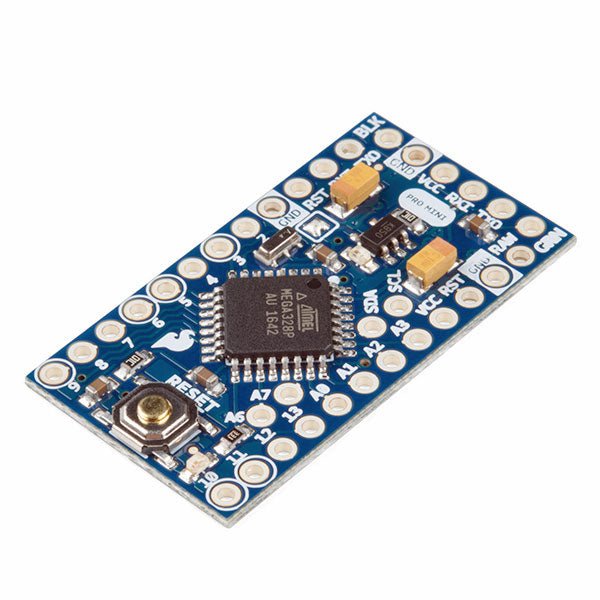
SparkFun SparkFun Arduino Pro Mini 328 (5 V, 16 MHz)
De Arduino Pro Mini is een microcontroller board gebaseerd op de ATmega328P. Het heeft 14 digitale in-/uitgangspinnen (waarvan er 6 kunnen worden gebruikt als PWM-uitgangen), 6 analoge ingangen, een on-board resonator, een reset-knop, en gaten voor het monteren van pin headers. Een six-pin header kan worden aangesloten op een FTDI-kabel of Sparkfun breakout board om USB-voeding en communicatie te bieden aan de board. De Arduino Pro Mini is bedoeld voor semi-permanente installatie in voorwerpen of tentoonstellingen. Het board komt zonder pre-gemonteerde headers, waardoor het gebruik van diverse types van schakelaars of het directe solderen van draden is toegestaan. De pin lay-out is compatibel met Arduino Mini. Specificaties Microcontroller ATmega328P Boord Stroomvoorziening 5-12 V Circuit Werkspanning 5 V Digitale I/O Pinnen 14 PWM Pennen 6 UART 1 SPI 1 I²C 1 Analoge ingangspinnen 6 Externe Onderbrekingen 2 DC stroom per I/O Pin 40 mA Flash Geheugen 32 KB waarvan 2 KB gebruikt door bootloader SRAM 2 KB EEPROM 1 KB Kloksnelheid 16 MHz Afmetingen 18 x 33,3 mm Downloads Eagle files Schematics
€ 14,95€ 7,95Beste prijs
-

Elektor Bundles Arduino UNO Q (Bundel)
Deze bundel bevat de Arduino UNO Q (2 GB) en het boek "Arduino UNO Q and AI". De Arduino UNO Q is het eerste UNO-bord met een hybride dual-brain-architectuur, waarbij een krachtige Linux-processor wordt gecombineerd met een realtime-microcontroller – zo worden geavanceerde rekenkracht en nauwkeurige besturing op één bord samengebracht. Aangedreven door een Qualcomm Dragonwing QRB2210 MPU met Debian Linux en een STM32U585 MCU voor realtime taken, is de UNO Q gebouwd voor toepassingen van de volgende generatie. Van Edge Computing en AI tot robotica en automatisering, het levert hoge prestaties zonder in te boeten aan gebruiksgemak. Sluit gewoon uw randapparatuur aan en ga aan de slag – er is geen extra hardware nodig. Kenmerken Dual-core architectuur: Linux MPU + realtime MCU Qualcomm Dragonwing QRB2210 met ondersteuning voor Debian Linux STM32U585-microcontroller voor deterministische besturing Voert Arduino-schetsen uit via Zephyr OS Ideaal voor AI, IoT, robotica en industriële projecten Specificaties Microprocessor (MPU) Qualcomm Dragonwing QRB2210:Quad-core Arm Cortex-A53 @ 2,0 GHzAdreno GPU 3D-grafische accelerator2× ISP (13 MP + 13 MP of 25 MP) @ 30 fps Microcontroller (MCU) STM32U585Arm Cortex-M33 tot 160 MHz2 MB flashgeheugen786 KB SRAM RAM 2 GB LPDDR4 Voeding Via USB-C-connector 5 V max bij 3 AIngangsspanning (VIN): 7-24 V Geheugen 16 GB eMMC USB 1× USB-C-poort met host/device-rolschakeling, stroomrolschakeling en video-uitgang Connectiviteit Wi-Fi 5 (2,4/5 GHz) met ingebouwde antenneBluetooth 5.1 met ingebouwde antenne antenne Interfaces I²C/I³CSPIPWMCANUARTPSSIGPIOJTAGADC Video Ondersteuning voor video-uitvoer via USB-CMIPI DSI-pinnen op JMEDIA-header Extra 4× RGB-LED's die door de gebruiker kunnen worden aangestuurd8×13 blauwe LED-matrix1× Qwiic-connector, spanning 3V3, I²C1× drukknop voor de gebruikerJCTL: MPU Remote Debug connector Audio Microfoon IN / Hoofdtelefoon UIT / Lijn UIT op JMISC MPU-besturingssysteem Linux Debian OS met upstream-ondersteuning Realtime-besturingssysteem Arduino Core op Zephyr OS Containerisatie Ondersteuning voor Docker en Docker Compose Ondersteunde besturingssystemen voor Arduino App Lab Windows: Windows 10 of later (64-bit)macOS: macOS 11 of later (64-bit)Linux: Ubuntu 22.04 of later en Debian Trixie (64-bit) Afmetingen 68,85 × 53,34 mm (UNO-vormfactor) Downloads Datasheet User Manual Pinout Schematics Boek: Arduino UNO Q and AI – Learn to Build Intelligent Embedded Systems Bouw slimmere embedded systemen met de Arduino UNO Q. Dit boek biedt u de tools, kennis en het vertrouwen om ideeën om te zetten in intelligente, werkende oplossingen met het Arduino UNO Q-platform. Ontdek hoe u intelligente embedded systemen kunt bouwen met de Arduino UNO Q en AI. Ontgrendel het volledige potentieel van de Arduino UNO Q, een next-generation platform dat de realtime kracht van de STM32U585-microcontroller combineert met de flexibiliteit van een Qualcomm Dragonwing QRB2210-microprocessor. Leer hoe u snel realistische toepassingen kunt prototypen met de Arduino IDE voor low-level embedded besturing en Python in Arduino App Lab voor high-level ontwikkeling. Bouw vertrouwen op met praktische projecten die u stap voor stap begeleiden van basisfunctionaliteiten tot volledig werkende systemen. Verken kant-en-klare, op AI gebaseerde Arduino App Lab-voorbeelden en ontdek hoe deze uw ontwikkeling kunnen versnellen en de time-to-market verkorten. Zet uw eerste stappen in de wereld van Edge AI met een duidelijke en praktische introductie tot Edge Impulse Studio – geen eerdere AI-ervaring vereist. Volg een volledige, realistische workflow om een Keyword Spotting AI-toepassing te ontwikkelen, inclusief dataverzameling, modeltraining, optimalisatie en on-device inferentie met behulp van Edge Impulse Studio. Overbrug de kloof tussen embedded systemen en machine learning en leer hoe u intelligentie direct op uw hardware kunt implementeren. Perfect voor embedded engineers, docenten, studenten en makers die voorop willen blijven lopen in AI-gedreven productontwikkeling. Deze bundel bevat: Arduino UNO Q (2 GB) (t.w.v. € 50) Boek: Arduino UNO Q and AI (t.w.v. € 35)
€ 84,95€ 74,95Beste prijs
-
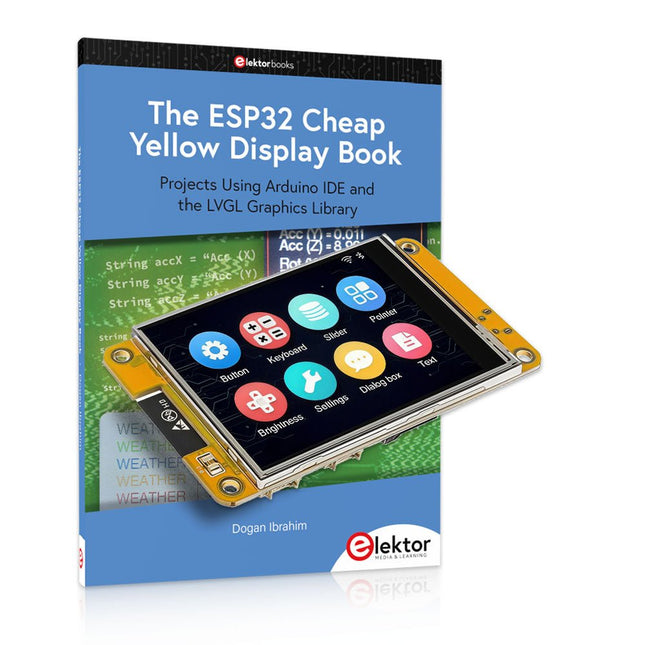
Elektor Bundles The ESP32 Cheap Yellow Display Bundel
Meer dan 40 volledig geteste ESP32-projecten met Arduino IDE en de LVGL grafische bibliotheek Deze bundel bevat de ESP32 Cheap Yellow Display (CYD) – een compact ontwikkelbord dat een standaard ESP32-microcontroller combineert met een TFT-kleurendisplay van 320 x 240 pixels. Het bord beschikt ook over meerdere aansluitingen voor GPIO, seriële communicatie (TX/RX), voeding en aarde. Het ingebouwde display is een groot voordeel, omdat gebruikers hiermee complexe, grafische projecten kunnen maken zonder dat er externe LCD's of displays nodig zijn. Het bijbehorende boek introduceert de hardware en de ingebouwde aansluitingen van het CYD-bord in detail. Het biedt een reeks projecten van beginners- tot gevorderdenniveau, ontwikkeld met de populaire Arduino IDE 2.0. Zowel basis grafische functies als de krachtige LVGL grafische bibliotheek worden behandeld, met praktische projecten die elke aanpak illustreren. Alle meegeleverde projecten zijn volledig getest en klaar voor gebruik. Het boek bevat blokdiagrammen, circuitschema's, complete codelijsten en stapsgewijze uitleg. Met de LVGL-bibliotheek kunnen lezers moderne, kleurrijke grafische interfaces maken met behulp van widgets zoals knoppen, labels, schuifregelaars, kalenders, toetsenborden, grafieken, tabellen, menu's, animaties en meer. ESP32 Cheap Yellow Display Board Dit ontwikkelbord (ook bekend als "Cheap Yellow Display") wordt aangedreven door de ESP-WROOM-32, een dual-core MCU met geïntegreerde Wi-Fi- en Bluetooth-mogelijkheden. Het werkt op een hoofdfrequentie tot 240 MHz, met 520 KB SRAM, 448 KBROM en 4 MB Flash-geheugen. Het bord is voorzien van een 2,8-inch scherm met een resolutie van 240 x 320 en resistieve aanraking. Bovendien bevat het bord een achtergrondverlichtingsbesturingscircuit, aanraakbesturingscircuit, luidsprekeraandrijfcircuit, lichtgevoelig circuit en RGB-LED-besturingscircuit. Het biedt ook een TF-kaartsleuf, seriële interface, DHT11 temperatuur- en vochtigheidssensorinterface en extra IO-poorten. De module ondersteunt ontwikkeling in Arduino IDE, ESP-IDE, MicroPython en Mixly. Toepassingen Beeldoverdracht voor Smart Home-apparaat Draadloze bewaking Slimme landbouw Draadloze QR-herkenning Signaal van draadloos positioneringssysteem En andere IoT-toepassingen Specificaties Microcontroller ESP-WROOM-32 (Dual-core MCU met geïntegreerde Wi-Fi en Bluetooth) Frequentie Tot 240 MHz (rekenkracht is maximaal 600 DMIPS) SRAM 520 KB ROM 448 KB Flash 4 MB Bedrijfsspanning 5 V Stroomverbruik ca. 115 mA Display 2,8" TFT-kleurenscherm (240 x 320) Touch Resistief Touch Driver chip ILI9341 Afmetingen 50 x 86 mm Gewicht 50 g Downloads GitHub Deze bundel bevat: The ESP32 Cheap Yellow Display Book (normale prijs: € 35) ESP32 Cheap Yellow Display Board (normale prijs: € 25) 1x ESP32 Dev Board met 2,8" display en acryl-behuizing 1x Touchpen 1x Aansluitkabel 1x USB-kabel
€ 59,95€ 49,95Beste prijs
-

Elektor Bundles Build Smart Projects with the XIAO ESP32-C3 Board (Bundel)
Deze bundel bevat alles wat u nodig hebt om direct aan de slag te gaan met het XIAO ESP32-C3 development board. Leer de basisprincipes van de ESP32-C3 en bouw praktische projecten met Wi-Fi, Bluetooth, sensoren, displays, PWM, Deep Sleep en nog veel meer. Boek: Build Smart Projects with the XIAO ESP32-C3 Board Het XIAO ESP32-C3 board combineert de ultracompacte vormfactor van de XIAO-serie met de uitgebreide mogelijkheden van de ESP32-C3-chip, inclusief geïntegreerde Wi-Fi en Bluetooth 5.0. Dit boek is een uitgebreide, praktische gids waarmee u het maximale uit dit krachtige en toch betaalbare development board kunt halen. De auteur neemt de lezer mee van de basisprincipes tot geavanceerde projecten. Na het laten knipperen en dimmen van leds komen ADC en PWM aan bod voor nauwkeurige sensoraansluiting en PWM-gestuurde lichteffecten. Vervolgens gaat u aan de slag met praktische toepassingen, waaronder: Een Wi-Fi-weerstation met OLED-display en actuele online weergegevens Een ultrasone parkeerassistent met akoestische feedback Een koelkastmonitor met klimaatsensoren en Deep Sleep voor jarenlang batterijgebruik Een retro Pong-spel dat contactloos met een sensor wordt bestuurd Een microfoongebaseerde party-app die reageert op handgeklap En nog veel meer: lichtregeling, reactietijdmeting, analyse van de netfrequentie, bodemvochtmeting, sfeerverlichting met leds en 7-segmentdisplays Seeed Studio XIAO ESP32C3 De Seeed Studio XIAO ESP32C3 is uitgerust met een sterk geïntegreerde ESP32-C3-chip, gebaseerd op een 32-bits RISC-V-processor met een viertraps pipeline die werkt met een kloksnelheid tot 160 MHz. Het board beschikt over een sterk geïntegreerde ESP32-C3 SoC. De chip bevat een volledig 2,4-GHz Wi-Fi-subsysteem en ondersteunt daarmee Station-modus, SoftAP-modus, SoftAP & Station-modus en promiscuous-modus voor uiteenlopende Wi-Fi-toepassingen. Tegelijkertijd werkt de chip met een zeer laag energieverbruik en ondersteunt hij Bluetooth 5 en Bluetooth Mesh. Met 400 KB SRAM en 4 MB Flash biedt de chip voldoende programmeerruimte en volop mogelijkheden voor IoT-besturingstoepassingen. Toepassingen Internet of Things Wearables Gezondheidsmonitoring Onderwijs Energiezuinige netwerken Snelle prototyping Specificaties Processor ESP32-C3 SoC RISC-V single-core 32-bit chip processor with a four-stage pipeline that operates at up to 160 MHz Wireless Complete 2.4GHz Wi-Fi subsystem Bluetooth Low Energy 5.0/ Bluetooth Mesh On-chip Memory 400 KB SRAM & 4 MB Flash Interface 1x UART, 1x I²C, 1x SPI, 11x GPIO (PWM), 4x ADC 1x Reset button, 1x Boot button Power (Typ.) Max 3.3 V Output Current: 500 mA Test Condition: BAT Pin Input @ 3.8 V Source Capability: 3 A Charging current: 380 mA(Fast) / 40 mA(Trickle) Input voltage (VIN): 5 VInput voltage (BAT): 3.7 V Deep Sleep Power Consumption Deep Sleep Mode: 44 μA Wi-Fi Enabled Power Consumption Active Mode: 75 mA Modem-sleep Mode: 25 mA Light-sleep Mode: 4 mA BLE Enabled Power Consumption Modem-sleep Mode: 27 mA Light-sleep Mode: 10 mA Dimensions 21 x 17.8 mm Inbegrepen 1x Seeed Studio XIAO ESP32C3 1x Antenne 2x 7-pins header Downloads Wiki Datasheet Deze bundel bevat: Boek: Build Smart Projects with the XIAO ESP32-C3 Board (t.w.v. € 35) Board: Seeed Studio XIAO ESP32C3 (t.w.v. € 10)
€ 44,95€ 39,95Beste prijs
-

Elektor Digital LPWAN Decoded (E-book)
LoRaWAN, Sigfox, NB-IoT & LTE-M Compared The Internet of Things depends on a critical question. How do you connect devices that must operate for years on tiny batteries, often miles from the nearest power outlet? This Elektor Technical Brief provides a practical guide to the technologies that have become the backbone of long-range, low-power IoT connectivity. Compiled by the Elektor Content Team, this concise technical brief examines the real engineering tradeoffs behind today’s leading Low-Power Wide-Area Network (LPWAN) technologies: LoRaWAN, Sigfox, NB-IoT, and LTE-M. By referencing a wide range of Elektor articles and other online content, this document explains why link budget, noise, bandwidth, and power consumption ultimately determine system performance. From there, it explores the architectures, strengths, limitations, and deployment realities of each major LPWAN technology, helping you understand not just how they work, but when and why to use them. Whether you’re designing smart meters, industrial sensors, agricultural monitoring systems, asset trackers, or connected infrastructure, this guide provides the insights needed to make informed connectivity decisions. Along the way, you’ll discover: Why LPWAN technologies emerged and where they fit in the IoT landscape The RF fundamentals that drive range, reliability, and battery life Details about LoRaWAN, Sigfox, NB-IoT, and LTE-M Practical comparisons of power, coverage, latency, cost, and deployment models Guidance for selecting the right LPWAN technology for your application Emerging trends shaping the future of long-range IoT connectivity Clear, accessible, and grounded in real engineering practice, this Technical Brief helps you move beyond specifications and marketing claims to understand what matters most. If you’re building connected products that need to survive in the field — not just in the lab — this is the LPWAN guide you’ll want at your side. Elektor helped launch the first wave of electronics makers in 1961. Since then, our global community has grown by hundreds of thousands of active members (comprising professional engineers, makers, and students) and more than 500 contributing experts. Every day, we inspire members to design and earn money with electronics.
€ 14,95
Leden: € 13,46
-

Elektor Digital Elektor Septembre/Octobre 2026 (PDF) FR
Le téléchargement intégral de ce numéro est disponible pour nos membres GOLD et GREEN sur le site Elektor Magazine ! Pas encore membre ? Cliquez ici. l'ESP-BLASTUn mini drone-fusée ESP32 qui vole à plus de 100 km/h atelier sans fil (1)Modules radio déverrouillés : émetteur-récepteur sub-GHz CC1101 433 MHz émetteur AMAvec le générateur d'ondes carrées/sinusoïdales sur Raspberry Pi Pico STM32Cube Innovation ChallengeParticipez avec votre meilleur projet STM32C5 CoffeeCallerComment une pause café a inspiré un PCB sur mesure audiotroniquesDistorsion harmonique totale Elektor à 65 ansProjets de septembre et octobre au fil des ans Bluetooth Channel Sounding pour le suivi des équipementsMesure de distance avec une précision centimétrique pour l’IoT de nouvelle génération 2026 : une Odyssée de l'IAL'informatique quantique n'est pas le prochain GPU protéger le cloud exige de sécuriser la périphérie premières expériences avec le HackRF ProTests pratiques avec le nouveau matériel SDR mise à niveau du modem de GPRS/2G vers LTE/4GExemple d'un panneau de contrôle d'alarme sans fil antenne en bouclePartie 1 : Une antenne ondes courtes à directivité réglable, à réaliser soi-même convertisseur de radio Internet en AMUn ESP32-S3 comme émetteur projet 2.0 mioty : aperçu généralL'approche de Fraunhofer pour les LPWAN sagesse d'atelierConseils pratiques d'experts Walter, le module IoT compactPartie 2 : Accéder aux services météorologiques et aux services de données
€ 10,95
-

Elektor Digital Elektor Juli/Augustus 2024 (PDF)
Elektor GREEN en GOLD leden kunnen deze uitgave hier downloaden. Nog geen lid? Klik hier om een lidmaatschap af te sluiten. Kleine warmtebeeldcameraeen op Arduino UNO gebaseerde DHZ-oplossing Project-update #3: ESP32-gebaseerde energiemeterintegratie en test met Home Assistant 2024: een AI-odysseeobjectdetectie verbeteren met verfijnde technieken De Raspberry Pi gaat AInieuwe kit bevat M.2 HAT+ met AI-versneller Sensoren voor weerstationswat is de beste keuze? Lees uw analoge watermeter uit met AI (1)koppel uw oude watermeter met het IoT! GSM-alarmdraadloze garagebeveiliging Low-power Thread-devices geoptimaliseerd en onder de loep genomenweinig vermogen... weinig inspanning? Uit het leven gegrepende genderkloof Zelfbouw-nevelkamermaak onzichtbare straling zichtbaar SparkFun Thing Plus Mattereen veelzijdig Matter-gebaseerd IoT development board IoT-retrofittenRS232-apparaten klaarstomen voor Industry 4.0 Stimuleer het IoT met 8-bit MCU’s Technologie stimuleert duurzaamheidvooruitgang leidt in veel toepassingen tot efficiënter energiegebruik AWS voor Arduino en co. (1)AWS IoT ExpressLink in de praktijk Luchtstroomdetector met alleen een Arduinozonder externe sensoren! Lekdetectorverbonden met de Arduino-cloud Kristallenvreemde onderdelen Universele logger voor de tuinAI-tuinieren komt een stapje dichterbij Analoge 1kHz-generatorsinussen met geringe vervorming Miletus: webapps offline gebruikeninclusief toegang tot het systeem en het apparaat! Van 4G naar 5Gis het echt zo eenvoudig? Alle begin......gaat symmetrisch
€ 9,95
-

Elektor Digital Develop and Operate Your LoRaWAN IoT Nodes (E-book)
Ready-to-use devices and self-built Arduino nodes in the 'The Things Network' LoRaWAN has developed excellently as a communication solution in the IoT. The Things Network (TTN) has contributed to this. The Things Network was upgraded to The Things Stack Community Edition (TTS (CE)). The TTN V2 clusters were closed towards the end of 2021. This book shows you the necessary steps to operate LoRaWAN nodes using TTS (CE) and maybe extend the network of gateways with an own gateway. Meanwhile, there are even LoRaWAN gateways suitable for mobile use with which you can connect to the TTN server via your cell phone. The author presents several commercial LoRaWAN nodes and new, low-cost and battery-powered hardware for building autonomous LoRaWAN nodes. Registering LoRaWAN nodes and gateways in the TTS (CE), providing the collected data via MQTT and visualization via Node-RED, Cayenne, Thingspeak, and Datacake enable complex IoT projects and completely new applications at very low cost. This book will enable you to provide and visualize data collected with battery-powered sensors (LoRaWAN nodes) wirelessly on the Internet. You will learn the basics for smart city and IoT applications that enable, for example, the measurement of air quality, water levels, snow depths, the determination of free parking spaces (smart parking), and the intelligent control of street lighting (smart lighting), among others.
€ 32,95
Leden: € 29,66
-
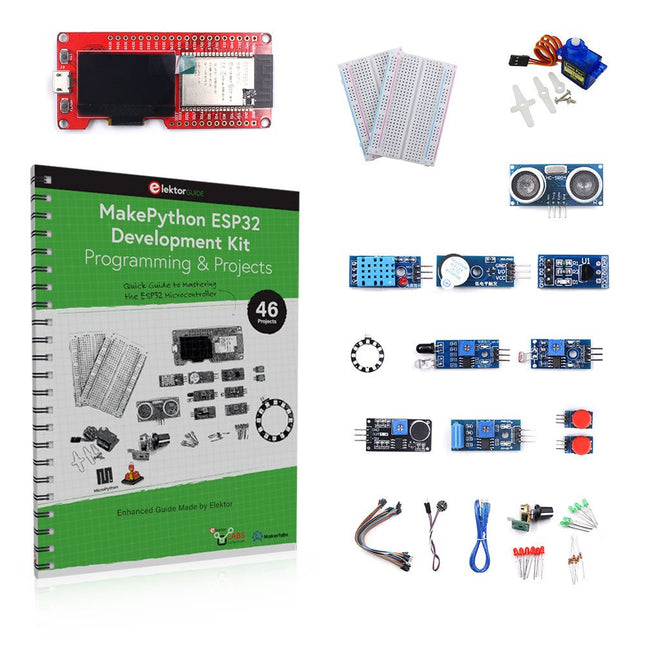
Elektor Bundles MakePython ESP32 Development Kit (EN)
Leer hoe je de ESP32 Microcontroller en het programmeren met MicroPython in je toekomstige projecten kunt gebruiken! Het (Engelstalige) projectboek, geschreven door de bekende Elektor auteur Dogan Ibrahim, bevat vele software- en hardware-gebaseerde projecten die speciaal voor de MakePython ESP32 ontwikkelkit ontwikkeld zijn. De kit wordt geleverd met verschillende LED's, sensoren, en actuatoren. De kit helpt je de basiskennis op te doen om eigen IoT projecten te maken. Alle volledig geëvalueerde projecten in het boek zijn voorzien van de bijgeleverde componenten. Elk project bevat een blokschema, een schakelschema, een volledige programmalijst, en een volledige programma beschrijving. Inbegrepen in de kit 1x MakePython ESP32 ontwikkelingsboard met LCD 1x Ultrasone afstandsmeter 1x Temperatuur- en luchtvochtigheidssensor 1x Zoemer module 1x DS18B20 module 1x Infrarood module 1x Potentiometer 1x WS2812 module 1x Geluidssensor 1x Trilsensor 1x Module met lichtgevoelige weerstand 1x Puls sensor 1x Servo motor 1x USB kabel 2x Knop 2x Breadboard 45x Schakeldraad 10x Weerstand 330R 10x LED (Rood) 10x LED (Groen) 1x Projectboek (Engelstalig, 206 pagina's) Boek met 46 projecten LED Projecten Knipperende LED SOS knipperende LED Knipperende LED – met behulp van een timer Afwisselend knipperende LEDs Knopbediening De knippersnelheid van de LED's veranderen met drukknop onderbrekingen Chasing-LEDs Binaire teller met LEDs Kerstverlichting (willekeurig-knipperende 8 LEDs) Elektronische dobbelsteen Geluksdag van het week Projecten voor Pulsewidth Modulation (PWM) Genereer een PWM golfvorm van 1000 Hz met 50% duty cycle LED helderheid regelen Meten van de frequentie en duty cycle van een PWM golfvorm Melodieën maker Eenvoudig elektronisch orgel Servo motor besturing Servo motor DS18B20 thermometer Projecten voor analoog naar digitaal converteren (ADC) Voltmeter Plotten van de analoge ingangsspanning Interne temperatuursensor van de ESP32 Ohmmeter Lichtgevoelige weerstandsmodule Projecten voor digitaal naar analoog converteren (DAC) Opwekken van vaste spanningen Opwekken van een zaagtand-golf signaal Opwekken van een driehoek-golf signaal Golfvorm met willekeurige periode Genereren van een sinus-golf signaal Genereren van een nauwkeurig sinus-golf signaal met behulp van een timer interrupts Gebruik van het OLED Display Seconden teller Gebeurtenisteller DS18B20 digitale thermometer met OLED ON-OFF temperatuur regelaar Meten van temperatuur en luchtvochtigheid Ultrasone afstandsmeting Hoogte van een persoon (stadiometer) Hartslag (polsslag) meten Andere bij de set geleverde sensoren Diefstal alarm Met geluid geactiveerd licht Infrarood obstakel-vermijding met zoemer WS2812 RGB LED ring Tijdregistratie van temperatuur en luchtvochtigheid Netwerkprogrammering Wi-Fi scanner Bediening op afstand vanuit de Internet browser (met een smartphone of PC) – Webserver Temperatuur- en luchtvochtigheidsgegevens opslaan in de Cloud Werking met Low-Power Gebruik een timer om de processor te laten ontwaken
€ 89,95€ 69,95Beste prijs
-

Elektor July/August 2026 (EN)
Elektor GREEN and GOLD members can download their digital edition here. Not a member yet? Click here. MultiRF Dev BoardA Platform for Evaluating Short- and Long-Range Wireless Protocols Elektor at 65Disrupting Electronics Since 1961 Wi-Fi-Based Person Detection on an ESP32When Your Router Becomes a Motion Sensor Wireless ScalesFour Small Scales = One Big Scale Walter, the Compact IoT ModuleESP32-S3 SoC, LTE-M/NB-IoT 5G Modem, and GNSS Receiver 3- and 4-Wire RTD Sensors ConditioningWith Full-Scale Adjustment and Cable Compensation 3-in-1 2-Channel Oscilloscope/Generator/MultimeterA Review of The Fnirsi 2D15P electronica Fast Forward 2026 Invites Startups and Industry Partners EcologgingA Modular Environmental IoT Station for Field Research Wireless Connectivity in Medical ApplicationsAlways on the Pulse with Bluetooth LE AudiotronicsHum Reduction Increasing Agricultural Efficiency with AI Modeling and SensorsBoosting Agricultural Productivity OPC UA — An OverviewPlatform-Independent Data Exchange Redox Meter Instrumentation Amplifier for Physics and Engineering Experiments Active Differential Audio FiltersFor Professional Crossovers and More Elektor Community Perspectives on IoT & Sensors Telegram-Controlled Water Heater Interface ModuleA Solution Based on an ESP32 and Arduino Software 2026: An AI OdysseyWhatever Happened to Fuzzy Logic? Err-lectronics Alarm Signal Injector Plus PowerTools for Finding Broken Wires
€ 14,90


-
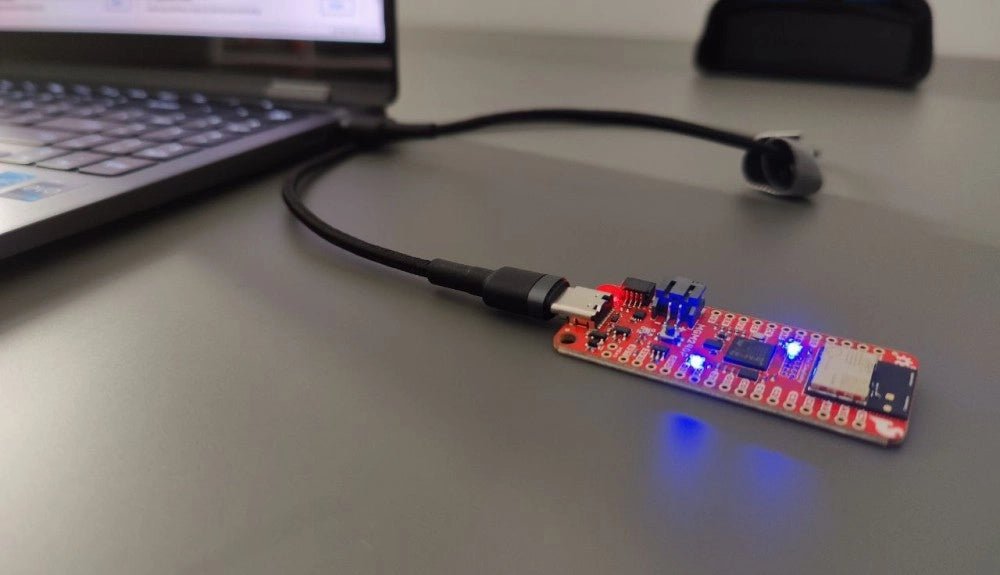
, van Saad Imtiaz SparkFun Thing Plus Matter (MGM240P): Een veelzijdig Matter gebaseerd IoT Ontwikkelboard (Review)
De SparkFun Thing Plus Matter - MGM240P is a veelzijdig ontwikkelboard dat rijk is aan features en ontworpen is voor het ontwikkelen van Matter-gebaseerde IoT...
-
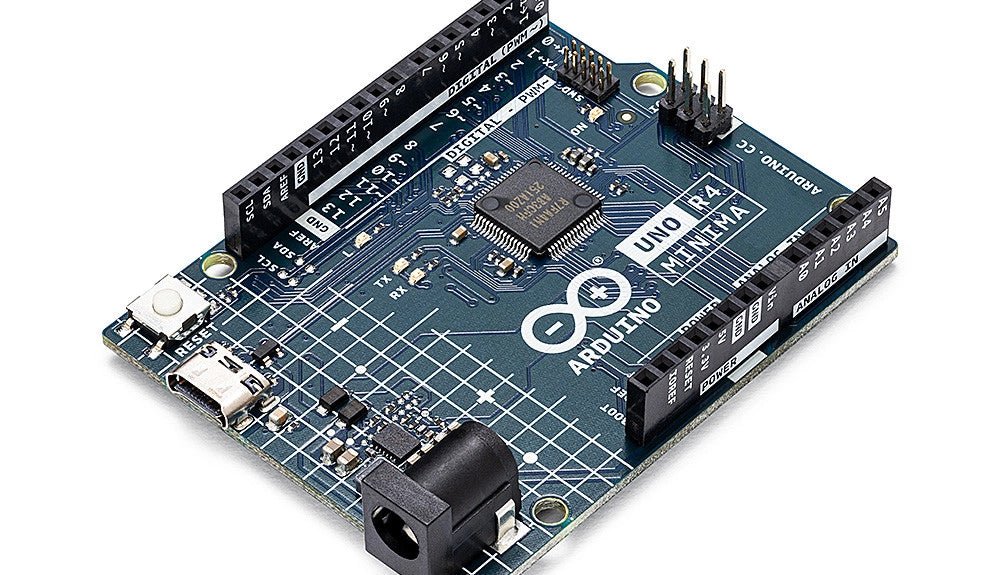
, van Clemens Valens Een review van twee nieuwe Arduino UNO R4-boards: Minima en WiFi
De Arduino UNO R4 Minima en de Arduino UNO R4 WiFi werden een paar maanden geleden aangekondigd, maar zijn nu officieel uitgebracht. Dus nu ze echt...
