Raspberry Pi HAT's

14 producten

  •  -60% PiKVM V3 KVM over IP for Raspberry Pi 4 - Elektor

    PiKVM PiKVM V3 KVM over IP voor Raspberry Pi 4

    PiKVM V3 is een open-source op Raspberry Pi-gebaseerde KVM over IP toepassing. Het helpt je om servers of werkstations op afstand te beheren, ongeacht de toestand van het besturingssysteem en ongeacht of het al dan niet geïnstalleerd is. Met PiKVM V3 kun je je computer aan/uit zetten of herstarten, de UEFI/BIOS configureren, en zelfs het OS opnieuw installeren met de virtuele CD-ROM of flash drive. Je kunt je toetsenbord en muis op afstand bedienen of PiKVM kan een toetsenbord, muis en een monitor simuleren, die dan in een web browser worden getoond alsof je rechtstreeks op een systeem op afstand werkt. Features HDMI Full HD capture op basis van de TC358743 chip (extra lage latentie ~100 ms en veel functies zoals compressieregeling). OTG toetsenbord en muis; emulatie van drives voor data opslag. Mogelijkheid om een USB "verwijderen en insteken" te simuleren. ATX voedingsregeling op de kaart Ventilatorregelaar aan boord Real-time klok (RTC) RJ-45 en USB seriële consolepoort (om PiKVM OS te beheren of om verbinding te maken met de server). Optionele op AVR gebaseerde HID (voor zeldzame en ongebruikelijke moederborden waarvan de BIOS het OTG geëmuleerde toetsenbord niet herkent). Optioneel OLED scherm om de netwerk status of andere gewenste informatie te tonen. Kant-en-klaar board. Je hoeft niet te solderen of een breadboard te gebruiken. PiKVM OS – de software is volledig open source. Inbegrepen PiKVM V3 HAT voor Raspberry Pi 4 USB-C bridge board – om de HAT via USB-C met de Pi te verbinden ATX controller adapter bord en bedrading – om de HAT met het moederbord te verbinden (als je de stroomvoorziening via hardware wilt regelen). 2 platte CSI-kabels Schroeven en messing afstandhouders Benodigdheden Raspberry Pi 4 MicroSD-kaart USB-C naar USB-A kabel HDMI-kabel Straight Ethernet-kabel (voor de ATX uitbreidingskaart aansluiting) Voeding (5,1 V/3 A USB-C, officiele RPi voeding wordt aanbevolen) Downloads Gebruikershandleiding Images GitHub Links Het PiKVM-project en de ervaringen van de ontwikkelaar: Een interview met Maxim Devaev Raspberry Pi als KVM-afstandsbediening

    € 229,00€ 91,60

    Leden identiek

  •  -60% Raspberry Pi 5 M.2 HAT+ - Elektor

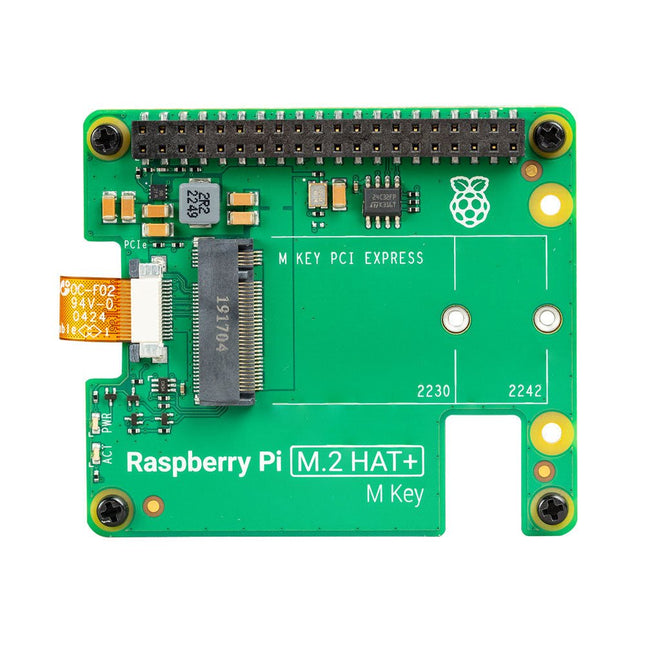
    Raspberry Pi Foundation Raspberry Pi 5 M.2 HAT+

    Met de Raspberry Pi M.2 HAT+ kunt u M.2-randapparatuur, zoals NVMe-schijven en AI-versnellers, aansluiten op de PCIe 2.0-interface van Raspberry Pi 5, en ondersteunt snelle (tot 500 MB/s) gegevensoverdracht naar en van NVMe-schijven en andere PCIe-accessoires. Raspberry Pi M.2 HAT+ ondersteunt apparaten met de M.2 M key edge-connector, in de 2230- en 2242-vormfactoren. Hij kan tot 3 A leveren aan aangesloten M.2-apparaten. Kenmerken Ondersteunt single-lane PCIe 2.0-interface (piekoverdrachtssnelheid van 500 MB/s) Ondersteunt apparaten die de M.2 M Key Edge-connector gebruiken Ondersteunt apparaten met de 2230- of 2242-vormfactor Kan tot 3 A leveren aan aangesloten M.2 apparaten Stroom- en activiteits-LED's Inbegrepen 1x Raspberry Pi 5 M.2 HAT+ 1x Lintkabel 1x GPIO-stapelheader 4x Afstandhouders 8x Schroeven Downloads Datasheet Schematics Assembly instructions

    € 13,95€ 5,58

    Leden identiek

  •  -60% Raspberry Pi Build HAT - Elektor

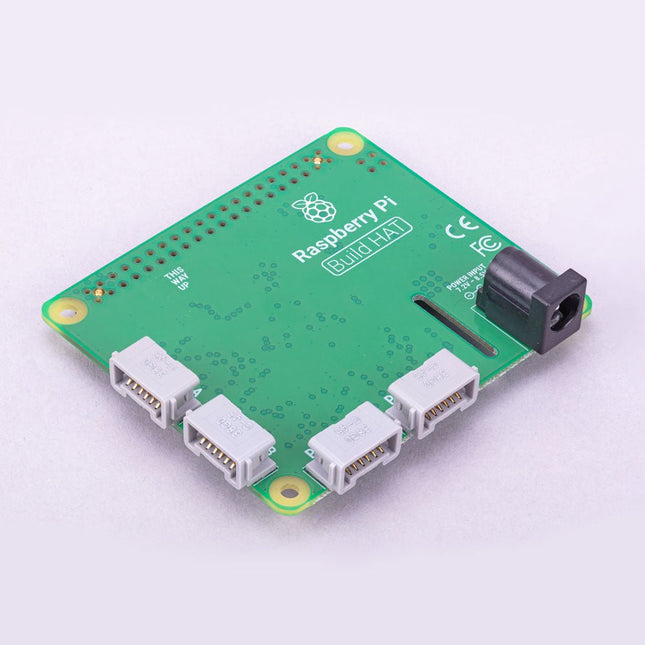
    Raspberry Pi Foundation Raspberry Pi Build HAT

    Build robust, intelligent machines that combine Raspberry Pi computing power with LEGO components.The Raspberry Pi Build HAT provides four connectors for LEGO Technic motors and sensors from the SPIKE Portfolio. The available sensors include a distance sensor, a colour sensor, and a versatile force sensor. The angular motors come in a range of sizes and include integrated encoders that can be queried to find their position.The Build HAT fits all Raspberry Pi computers with a 40-pin GPIO header, including?–?with the addition of a ribbon cable or other extension device?—?Raspberry Pi 400. Connected LEGO Technic devices can easily be controlled in Python, alongside standard Raspberry Pi accessories such as a camera module.Features Controls up to 4 motors and sensors Powers the Raspberry Pi (when used with a suitable external PSU) Easy to use from Python on the Raspberry Pi

    € 29,95€ 11,98

    Leden identiek

  • Raspberry Pi PoE+ HAT - Elektor

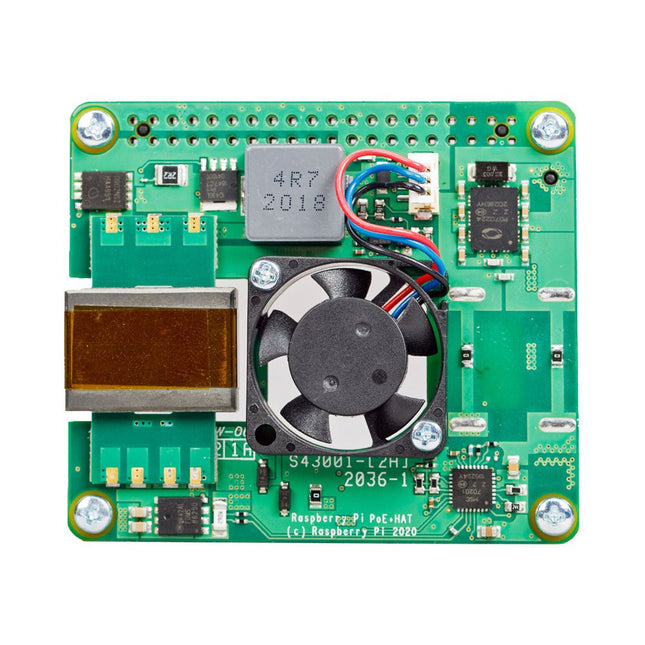
    Raspberry Pi Foundation Raspberry Pi PoE+ HAT (voor Raspberry Pi 3 B+ en 4)

    Niet op voorraad

    De Raspberry Pi PoE+ HAT is een add-on board ontworpen voor Raspberry Pi 3 B+ en Raspberry Pi 4 uitgerust met PoE-pinnen. Het voedt de Raspberry Pi via een Ethernet-kabel, mits er compatibele Power-Sourcing Equipment (PSE) aanwezig is op het Ethernet-netwerk. Daarnaast bevat de HAT een geïntegreerde ventilator om de Raspberry Pi-processor te koelen. Specificaties Standaard IEEE 802.3at-2003 PoE Ingangsspanning 37-57 V DC, apparaat van klasse 4 Uitgangsspanning 5 V DC/4 A Koeling 25 x 25 mm borstelloze ventilator die 2,2 CFM levert voor processorkoeling Bedrijfstemperatuur 0°C tot +50°C Downloads Datasheet

    Niet op voorraad

    € 24,95

    Leden identiek

  • Raspberry Pi Sense HAT - Elektor

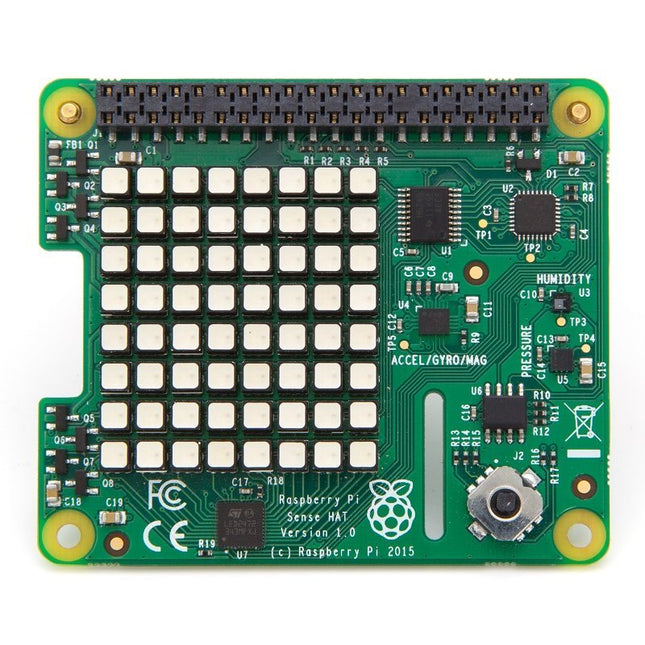
    Raspberry Pi Foundation Raspberry Pi Sense HAT

    Niet op voorraad

    The official Sense HAT from the Raspberry Pi Foundation is an add-on board for Raspberry Pi (4, 3, 2, B+ and A+). The Sense HAT has the following sensors: 8x8 RGB LED matrix display Accelerometer Gyroscope Magnetometer Air pressure sensor Temperature Humidity sensor Five-button joystick

    Niet op voorraad

    € 34,95

    Leden € 31,46

  •  -60% Fan SHIM - Active Cooling for Raspberry Pi 4 - Elektor

    Pimoroni Fan SHIM - Active Cooling for Raspberry Pi 4

    When Raspberry Pi 4's system on chip (SoC) achieves a certain temperature, it lowers its operating speed to protect itself from harm. As a result, you don't get maximum performance from the single board computer. Fan SHIM is an affordable accessory that effectively eliminates thermal throttling and boosts the performance of RPi 4. It's quite easy to attach the fan SHIM to Raspberry pi: fan SHIM uses a friction-fit header, so it just slips onto your Pi's pins and it's ready to go, no soldering required! The fan can be controlled in software, so you can adjust it to your needs, for example, toggle it on when the CPU reaches a certain temperature etc. You can also program the LED as a visual indicator of the fan status. The tactile switch can also be programmed, so you can use it to toggle the fan on or off, or to switch between temperature-triggered or manual mode. Features 30 mm 5 V DC fan 4,200 RPM 0.05 m³/min air flow 18.6 dB acoustic noise (whisper-quiet) Friction-fit header No soldering required RGB LED (APA102) Tactile switch Basic assembly required Compatible with Raspberry Pi 4 (and 3B+, 3A+) Python library and daemon Pinout Scope of delivery Fan SHIM PCB 30 mm 5 V DC fan with JST connector M2.5 nuts and bolts Assembly The assembly is really simple and almost takes no time With the component side of the PCB facing upwards, push the two M2.5 bolts through the holes from below, then screw on the first pair of nuts to secure them and act as spacers. Push the fan's mounting holes down onto the bolts, with the cable side of the fan downwards (as pictured) and the text on the fan upwards. Attach with another two nuts. Push the fan's JST connector into the socket on Fan SHIM. Software With the help of Python library you can control the fan (on/off), RGB LED, and switch. You'll also find a number of examples that demonstrate each feature, as well as a script to install a daemon (a computer program that runs as a background process) that runs the fan in automatic mode, triggering it on or off when the CPU reaches a threshold temperature, with a manual override via the tactile switch.

    € 13,95€ 5,58

    Leden identiek

  •  -60%Bijna uitverkocht Waveshare Stack HAT for Raspberry Pi - Elektor

    Waveshare Waveshare Stack HAT for Raspberry Pi

    Nog 2 op voorraad

    This is an I/O expansion kit designed for Raspberry Pi, which provides 5 sets of 2x20 pinheaders, that means a handy way to 'stack' multi different HATs together, and use them as a specific combination / project. Features Standard Raspberry Pi connectivity, directly pluggable OR through ribbon cable 5 sets of 2x20 pinheaders, connect multi HATs together USB external power port, provides enough power supply for multi HATs Clear and descriptive pin labels for easy use Reserved jumper pads on the bottom side, pin connections are changeable by soldering, to avoid pin conflicts Note: make sure there are no any pin conflicts between the HATs you want to use together before connecting. Specifications Dimensions: 183 × 65 mm Mounting hole size: 3 mm Included 1x Stack HAT 1x Ribbon cable 40-Pin 1x 2x20 male pinheader 1x RPi screws pack (4pcs) x1

    Nog 2 op voorraad

    € 17,95€ 7,18

    Leden identiek

  •  -60% Cytron Maker pHAT for Raspberry Pi - Elektor

    Cytron Cytron Maker pHAT voor Raspberry Pi

    The Maker pHAT is the solution to the most common problems beginners face starting with Raspberry PI. Its intelligent and simple design makes it easy to attach to your Pi, and it helps you avoid all the tedious work of connection various other accessories. Additionally, the LEDs corresponding to each pin makes it extremely easy to see where a potential problem lies The Maker pHat has the same size as the Raspberry Pi Zero with all 4mounting holes aligned. However, it can be used with Raspberry Pi 3B, 3B+ and 3A+, by inserting a 2 x 20 stacking header. Kenmerken Raspberry Pi Zero size, stack perfectly on to Raspberry Pi Zero Compatible with standard size Raspberry Pi 3B / 3B+, medium size Raspberry Pi 3A+ and smaller size Raspberry Pi Zero / W / WH. Standard Raspberry Pi GPIO footprint. LED array for selected GPIO pins (GPIO 17, 18, 27, 22, 25, 12, 13, 19). 3x on board programmable push buttons (GPIO 21, 19 and 20, need to configure as input pull up). Onboard active buzzer (GPIO 26). Proper labels for all GPIOs, including SPI, UART, I2C, 5V, 3.3V, and GND. Utilize USB Micro-B socket for 5V input and USB to UART communication. USB serial facilitated by the FT231X Input voltage: USB 5 V, from a computer, power bank or a standard USB adapter.

    € 14,95€ 5,98

    Leden identiek

  •  -60% Waveshare Mini Base Board (A) for Raspberry Pi Compute Module 4 - Elektor

    Waveshare Waveshare Mini Base Board (A) for Raspberry Pi Compute Module 4

    Specifications CM4 socket Suitable for all variants of Compute Module 4 Networking Gigabit Ethernet RJ45 connectorM.2 M KEY, supports communication modules or NVME SSD Connector Raspberry Pi 40-PIN GPIO header USB 2x USB 2.0 Type A2x USB 2.0 via FFC connector Display MIPI DSI display port (15-pin 1.0 mm FPC connector) Camera 2x MIPI CSI-2 camera port (15-pin 1.0 mm FPC connector) Video 2x HDMI port (including one port via FFC connector), supports 4K 30fps output RTC N/A Storage MicroSD card socket for Compute Module 4 Lite (without eMMC) variants Fan header No fan control, 5 V Power input 5 V Dimensions 85 x 56 mm Included 1x CM4-IO-BASE-A 1x SSD mounting screw Downloads Wiki

    € 24,95€ 9,98

    Leden identiek

  •  -60% 4tronix Picon Zero v1.3 - Intelligent Robotics Controller for Raspberry Pi - Elektor

    4tronix 4tronix Picon Zero v1.3 - Intelligent Robotics Controller for Raspberry Pi

    The Picon Zero is an add-on for the Raspberry Pi. It has the same size as a Raspberry Pi Zero, making it ideal to function as a pHat. Of course, it can be used on any other Raspberry Pi via a 40-pin GPIO connector.As well as two full H-Bridge motor drivers, the Picon Zero has several Input/Output pins giving you multiple configuration options. That allows you to easily add outputs or analog inputs to your Raspberry Pi without any complicated software or kernel-specific drivers. At the same time, it opens up 5 GPIO pins from the Raspberry Pi, and it provides the interface for an HC-SR04 ultrasonic distance sensor.The Picon Zero comes with all components, including the headers and screw terminals, fully soldered. Soldering isn't required. You can use it right out of the box.Features pHat format PCB: 65 mm x 30 mm Two full H-Bridge motor drivers. Drive up to 1.5 A continuously per channel, at 3 V - 11 V. Each motor output has both a 2-pin male header and a 2-pin screw terminal. The motors can be powered from the Picon Zero's 5 V or an external power source (3 V - 11 V). The Picon Zero's 5 V can be selected to be from the Raspberry Pi's 5 V line, or a USB connector on the Picon Zero. That means that you can effectively have 2 USB battery banks: one to power the servos and motors on the Picon Zero and the other to power the Pi. 4 Inputs that can accept up to 5 V. These inputs can be configured as follows: Digital inputs Analog inputs DS18B20 DHT11 6 Outputs that can drive 5 V and be configured as: Digital Output PWM Output Servo NeoPixel WS2812 All Inputs and Outputs use GVS 3-pin male headers. 4-pin female header that connects directly to an HC-SR04 ultrasonic distance sensor. 8-pin female header for Ground, 3.3 V, 5 V, and 5 GPIO signals allowing you to add their additional features. Hardware ConfigurationPicon Zero has two jumpers for setting the hardware configuration. Ensure that you have placed them in the correct position. JP1 – Board 5 V Selector. This jumper selects where to get the 5 V power from for the Picon Zero Outputs. The options are: Jumper at the top between RPI and 5 V. The 5 V power for the board is taken from the Raspberry Pi pins on the GPIO connector. Because of the low power output devices and the 5 V motors, all devices can be powered with a single 5 V power input. Jumper at the bottom between USB and 5 V. The 5 V power is taken from the microUSB connector on the Picon Zero. Useful for higher power output devices, since you can provide extra power through the micro-USB connector on the board JP2 – Motor Power Selector. This jumper selects where the motors get the power. The two options here are the following: Jumper at the top between MotorPower and Vin. The motors are driven via the 2-pin screw terminal. The voltage can be between 3 V and 11 V. Useful for motors that require a voltage different from 5 V, or that require more current than is available on either of the USB input connectors Jumper at the bottom between 5 V and MotorPower. The motors are driven from the board's 5 V. Raspberry Pi ConfigurationThe Picon Zero is an I²C device. Make sure your Raspberry Pi is set up correctly to use I²C and SMBus: sudo apt-get install python-smbus python3-smbus python-dev python3-dev sudo nano /boot/config.txt Add the following lines at the end of the file dtparam=i2c1=on dtparam=i2c_arm=on Press Ctrl-X and use the default prompts to save sudo reboot Plugin the Picon Zero onto the Pi and run i2cdetect -y 1If everything goes well, you will see the Picon Zero showing up as address 22 as shown below:

    € 18,95€ 7,58

    Leden identiek

  •  -60% Picade X HAT USB - C - Elektor

    Pimoroni Picade X HAT USB-C

    Turn your Raspberry Pi into a retro games console! Picade X HAT includes joystick and button inputs, a 3 W I²S DAC/amplifier, and soft power switch. This HAT has all the same great features as the original Picade HAT but now has no-fuss female Dupont connectors to hook up your joystick and buttons. Simply pop Picade X HAT onto your Pi, plug a USB-C power supply into the connector on the HAT (it back-powers your Pi through the GPIO, so no need for a separate power supply), wire up your controls, and install the driver! It's ideal for your own DIY arcade cabinet builds, or for interfaces that need big, colourful buttons and sound. Features I²S audio DAC with 3 W amplifier (mono) and push-fit terminals Safe power on/off system with tactile power button and LED USB-C connector for power (back-powers your Pi) 4-way digital joystick inputs 6x player button inputs 4x utility button inputs 1x soft power switch input 1x power LED output Plasma button connector Breakout pins for power, I²C, and 2 additional buttons Picade X HAT pinout Compatible with all 40-pin Raspberry Pi models The I²S DAC blends both channels of digital audio from the Raspberry Pi into a single mono output. This is then passed through a 3 W amplifier to power a connected speaker. The board also features a soft power switch that allows you turn your Pi on and off safely without risk of SD card corruption. Tap the connected button to start up, and press and hold it for 3 seconds to fully shutdown and disconnect power. Software/Installation Open a terminal and type curl https://get.pimoroni.com/picadehat | bash to run the installer. You'll need to reboot once the installation is complete, if it doesn't prompt you to do so. The software does not support Raspbian Wheezy Notes With USB-C power connected through Picade X HAT you'll need either to tap the connected power button or the button marked 'switch' on the HAT to power on your Pi.

    € 24,95€ 9,98

    Leden identiek

  •  -60%Bijna uitverkocht JOY - iT MotoPi - Motor Control for Raspberry Pi - Elektor

    JOY-iT JOY-iT MotoPi - Motor Control for Raspberry Pi

    Nog 1 op voorraad

    The MotoPi is an extension-board to control and use up to 16 PWM-controlled 5 V servo motors. The board can be additional powered by a voltage between 4.8 V and 6 V so a perfect supply is always guaranteed and even larger projects can be powered. With the additional power supply and the integrated Analog-Digital-Converter, new possibilities can be reached. An additional power supply per motor is not required anymore because all connections (Voltage, Ground, Control) are directly connected to the board. The control and the programing can be directly done, as usual, on the Raspberry Pi. Special features 16 Channels, own clock generator, Inkl. Analog Digital Converter Input 1 Coaxial power connector 5.5 / 2.1 mm, 5 V / 6 A max Input 2 Screw terminal, 4.8-6 V / 6 A max Compatible with Raspberry Pi A+, B+, 2B, 3B Dimensions 65 x 56 x 24 mm Scope of supply Board, manual, fixing material

    Nog 1 op voorraad

    € 26,95€ 10,78

    Leden identiek

  •  -60% Seeed Studio GrovePi+ Add - on Board for Raspberry Pi - Elektor

    Seeed Studio Seeed Studio GrovePi+ Add-on Board for Raspberry Pi

    The GrovePi+ is an easy-to-use and modular system for hardware hacking with the Raspberry Pi, no need for soldering or breadboards: plug in your Grove sensors and start programming directly. Grove is an easy-to-use collection of more than 100 inexpensive plug-and-play modules that sense and control the physical world. By connecting Grove Sensors to Raspberry Pi, it empowers your Pi in the physical world. With hundreds of sensors to choose from Grove families, the possibilities for interaction are endless. Set-up in 4 simple steps Slip the GrovePi+ board over your Raspberry Pi Connect the Grove modules to the GrovePi+ board Upload your program to Raspberry Pi Begin taking in the world data Please note: Raspberry Pi board is not included

    € 49,95€ 19,98

    Leden identiek

  •  -60% Pimoroni Breakout Garden for Raspberry Pi (I²C) - Elektor

    Pimoroni Pimoroni Breakout Garden for Raspberry Pi (I²C)

    Thanks to its six sturdy slots, Breakout Garden enables the users to simply plug and play with various tiny breakout board.Just insert one or more boards into the slots in the Breakout Garden HAT and you’re ready to go. The mini breakouts feel secure enough in the edge-connector slots and are very unlikely to fall out.There are a number of useful pins along the top of Breakout Garden, which lets you connect other devices and integrate them into your project.You shouldn't be worried if you insert a board the wrong way thanks to provided reverse polarity protection. It doesn't matter which slot you use for each breakout either, because the I²C address of the breakout will be recognised by the software and it'll detect them correctly in case you move them around.Features Six sturdy edge-connector slots for Pimoroni breakouts 0.1” pitch, 5 pin connectors Broken-out pins (1 × 10 strip of male header included) Standoffs (M2.5, 10 mm height) included to hold your Breakout Garden securely Reverse polarity protection (built into breakouts) HAT format board Compatible with Raspberry Pi 3 B+, 3, 2, B+, A+, Zero, and Zero W It's suggested using the included standoffs to attache Breakout Garden to your Raspberry Pi.SoftwareBreakout Garden doesn't require any software of its own, but each breakout you use will need a Python library. On the Breakout Garden GitHub page you'll find an automatic installer, which will install the appropriate software for a given breakout. There are also some examples that show you what else you can do with Breakout Garden.

    € 19,95€ 7,98

    Leden identiek

Dat de Raspberry Pi computers ontzettend populair zijn, blijkt uit de 34 miljoen verkochte stuks. Maar dat de Pi computers en technologie tot in de ruimte aan toe reiken, is waarschijnlijk nieuw voor je.

Wat is een Raspberry Pi HAT?

Raspberry Pi HAT’s (Hardware Attached on Top) zijn een add-on module voor op jouw standaard mainbord. Als je meer uit je Raspberry projecten wilt halen, dan zijn HAT’s precies wat je zoekt. Je kunt de HAT’s zo inprikken dankzij de 40-pins GPIO header. Hierdoor breid je niet alleen de hardware uit, maar ook de mogelijkheden die je met die hardware hebt. Wil je meer halen uit de Rasberry Pi, dan zijn HAT’s onmisbaar.

Voor de introductie van de HAT, in 2014, waren er al veel hardwarematige add-ons ontwikkeld voor de minicomputers. Dit was voor Raspberry de reden om zelf een standaard te ontwikkelen dat het makers en programmeurs makkelijker moest maken.

Omdat het aansluiten van externe hardware op de Raspberry Pi een flink aantal handelingen met zich meebracht, is dit met de komst van de HAT verleden tijd. De HAT zorgt er namelijk voor dat de juiste driver automatisch word herkent, ingeladen en aangesloten.

Waar je een Raspberry Pi HAT's voor kunt gebruiken 

De mogelijkheden van de technologie en hardware van Raspberry was al groot, maar sinds de introductie van HATS in 2014 zijn deze nog groter geworden. Wie zijn Raspberry mainbord uitbreid met een HAT heeft naast de standaard functionaliteiten van de zijn Pi-model ook

  • Meer audio mogelijkheden te krijgen
  • Meer display mogelijkheden te krijgen
  • Of meer Motor & Servo mogelijkheden te krijgen

Met de HATs van Elektor kun je eindeloos combineren en jouw project beter, makkelijker en gebruiksvriendelijker maken.

Het Raspberry Pi assortiment bij Elektor Store

Elektorstore is als goedgekeurde wederverkoper van Raspberry Pi producten de webshop in Nederland om officiële Raspberry producten te kopen. Doordat er geen tussenverkoper tussen de fabriek en onze webshop zit kunnen wij ons assortiment tegen goedkope prijzen aanbieden.

Login

Wachtwoord vergeten?

Heb je nog geen account?
Maak account aan