
Zoekresultaten voor "official or micro or usb or power or supply or for or raspberry or pi"
-

OWON OWON P4603 DC Power Supply (180 W)
Features Channel Single Channel Output Total Output Power 180 W Channel Output 0 - 60 V / 0 - 3 A × 1-CH Display 3.7' color LCD display Dimension 117 mm(L) × 194 mm(H) × 295 mm(D) Weight Approx. 5.8 kg Interface RS232 Specifications Rated Output (0 ? - 40 ?) Voltage 0 - 60 V Current 3 A Load Regulation Voltage ? 0.01% + 3 mV Current ? 0.01% + 3 mA Power Regulation Voltage ? 0.01% + 3 mV Current ? 0.01% + 3 mA Setting Resolution Voltage 1 mV Current 1 mA Readback Resolution Voltage 1 mV Current 1 mA Setpoint accuracy (within 12 months) (25 ? ± 5 ?) Voltage ? 0.03% + 10 mV Current ? 0.1% + 5 mA Readback Resolution (25 ? ± 5 ?) Voltage ? 0.03% + 10 mV Current ? 0.1% + 5 mA Ripple/Noise (20 Hz - 20 MHz) Voltage (Vp-p) ? 4 mVp-p Voltage (Vrms) ? 1 mVrms Current (rms) ? 4 mArms Output temperature coefficient (0 ? - 40 ?) Voltage ? 0.03% + 10 mV Current ? 0.1% + 5 mA Readback temperature coefficient Voltage ? 0.03% + 10 mV Current ? 0.1% + 5 mA Response Time 100 ?s Storage 5 groups of data Working Temperature 0 - 40 ?
€ 164,57
-

Clearpath Robotics Clearpath Robotics TurtleBot 4 Lite
TurtleBot 4 is the next-generation of the world’s most popular open source robotics platform for education and research, offering better computing power, better sensors and a world class user experience at an affordable price point.TurtleBot 4 Lite is equipped with an iRobot Create 3 mobile base, a powerful Raspberry Pi 4 running ROS 2, OAK-D spatial AI stereo camera, 2D LiDAR and more. All components have been seamlessly integrated to deliver an out-of-the-box development and learning platform.Specifications Base platform iRobot Create 3 Wheels (Diameter) 72 mm Ground Clearance 4.5 mm On-board Computer Raspberry Pi 4 (4 GB) Maximum linear velocity 0.31 m/s in safe mode0.46 m/s without safe mode Maximum angular velocity 1.90 rad/s Maximum payload 9 kg Operation time 2h 30m – 4h depending on load Charging time 2h 30m Lidar RPLIDAR A1M8 Camera OAK-D-Lite User Power VBAT @1.9 A5 V @ Low current3.3 V @ Low current USB Expansion 2x USB 2.0 (Type A)2x USB 3.0 (Type A) Programmable LEDs Create 3 Lightring Buttons and Switches 2x Create 3 User buttons1x Create 3 Power Button Battery 26 Wh Lithium Ion (14.4 V nominal) Charging Dock Included Size (L x W x H) 342 x 339 x 192 mm Weight 3.3 kg DownloadsUser Manual
€ 1.699,00
Beste prijs
-

Elektor Academy Pro Arduino (programmeercursus)
Deze complete microcontroller-programmeercursus op basis van de Arduino Uno bevat een leerboek, een componentenkit, praktische projecten en een uitgebreide online cursus met simulaties. Ideaal om embedded systems stap voor stap te leren programmeren met Arduino via een praktische hands-on aanpak. Een praktische introductie tot embedded systems met de Arduino Uno Deze cursus is ontworpen voor beginners in embedded systems die op zoek zijn naar een gestructureerde en voorbeeldgerichte start. Een kit met LED’s en weerstanden, schakelaars, sensoren en actuatoren, displays, een breadboard en draden is inbegrepen. Deze worden in de cursus gebruikt om voorbeeldtoepassingen te demonstreren. Er is geen voorkennis van Arduino of embedded ontwikkeling vereist. Elke sectie bevat praktische voorbeelden en mini-projecten om belangrijke concepten te versterken en verdere verkenning te stimuleren. Aan het einde van de cursus kunt u niet alleen de voorbeelden reproduceren, maar ook uitbreiden met uw eigen ideeën en toepassingen. Wat leert u? Microcontrollerprogrammering met Arduino met behulp van het Uno R3 board Werken met digitale I/O, knoppen en encoders uitlezen, LED’s en relais aansturen Analoge ingangen, spanningen en sensoren uitlezen Genereren van analoge uitgangssignalen en PWM Gebruik van seriële communicatie zoals UART, I²C en SPI om displays aan te sturen en digitale sensoren en SD-kaarten uit te lezen Tijdbeheer Werken met interrupts Realtime sensorinput en besturing via knoppen, LED’s en displays Aansturen van actuatoren zoals relais en servomotoren Voor wie is dit? Studenten en zelflerenden die embedded systems willen ontdekken Makers en IoT-enthousiastelingen die hun hardwarevaardigheden willen verbeteren Docenten en trainers die kant-en-klaar lesmateriaal zoeken Wat zit er in de doos? Toegang tot de volledige cursus op het Elektor Academy Pro leerplatform Uno R3 microcontrollerboard + USB-kabel Boek: Programming Microcontrollers in C/C++ Using Arduino Downloadbare projectbestanden voor elke module Componentenkit: 2× LED, rood, 5 mm LED, groen, 5 mm 3× weerstand, 470 Ω, 0,25 W LDR Potentiometer, 10 kΩ, lineair Drukknop Rotary encoder module Relaismodule DHT22 temperatuur- en vochtigheidssensor TM1637-compatibel 4-digit 7-segment display MPU-6050 IMU met headers SSD1306-compatibel I²C OLED display Micro SD-kaartadapter met header Buzzer SG90 micro servo ILI9341-compatibel SPI 240×320 TFT display 20× jumper wires Breadboard Alle programmeercursussen (en verschillen in inhoud) Cursus Arduino Raspberry Pi Pico with Arduino C/C++ ESP32 with Arduino C/C++ Raspberry Pi Pico with MicroPython ESP32 with MicroPython Online cursus Access to Arduino Course Access to Pico with Arduino C/C++ Course Access to ESP32 with Arduino C/C++ Course Access to Pico with MicroPython Course Access to ESP32 with MicroPython Course Board Uno R3 Raspberry Pi Pico ESP32 Raspberry Pi Pico ESP32 Boek Programming Microcontrollers in C/C++ Using Arduino Programming Microcontrollers in C/C++ Using Arduino Programming Microcontrollers in C/C++ Using Arduino Programming Microcontrollers in MicroPython Programming Microcontrollers in MicroPython Kit 40-delige componenten-kit 40-delige componenten-kit 40-delige componenten-kit 40-delige componenten-kit 40-delige componenten-kit
€ 69,95
Leden: € 62,96
-

Elektor 03-04/2025 (DE)
Diese Ausgabe steht allen GOLD- und GREEN-Mitgliedern auf der ElektorMagazine-Website zum Download bereit! Sie sind noch kein Mitglied? Hier klicken! Die Open-Source-Prozessorarchitektur RISC-V16 Boards und MCUs, die Sie kennen sollten Audio-Player mit FPGA und EqualizerTeil 1. Digitale Audiosignale mischen mit einem MKR Vidor 4000 von Arduino Laserkopf für Pico-basierte SanduhrZeichnen mit Licht Nehmen Sie teil am STM32 Edge AI Contest! Umweltüberwachung von Pflanzen mit mehreren SensorenDrahtlose Messung der Wasserversorgung und Lichtverhältnisse Maixduino: Automatischer KI-TüröffnerGesichtserkennung mit einer Kamera Embedded-Elektronik 2024KI wird die Branche neu definieren Ladungsbasiertes In-Memory Compute bei EnCharge AI KI-Inferencing bei 10-fach geringerer Leistungsaufnahme zu 20-fach geringeren Kosten Click-Board hilft bei der Entwicklung und dem Training von ML-Modellen für die Schwingungsanalyse Der Elektor Mini-WheelieEin Bausatz für einen selbstbalancierenden Roboter MCU, ich sehe dich!MCUViewer, ein Open-Source-Multiplattform-Debugging-Werkzeug USB-2.0-IsolatorGeräte galvanisch isoliert per USB verbinden Eingriff vor dem SchadenPredictive Maintenance in der Praxis SPoE - Elektromagnetische VerträglichkeitSingle-Pair mit Power-over-Ethernet im EMV-Fokus Retro-TechnikWie das Farbfernsehen eine neue Welt schuf EKG-MonitorMit Hexabitz-Modulen und einem STM32CubeMonitor Der Kampf um KI at the Edge HaLow erreicht Rekorddistanz von 16 km für WLAN bei 900 MHz Erster CHERI RISC-V-Embedded Chip und Early Access Programm Die dritte Generation der Waldbrandfrüherkennung nutzt Satellitenverbindungen Aus dem Leben gegriffenDie Qual der Wahl Aller Anfang......ist nicht schwer: Wir setzen die Filterung und Klangregelung fort. Riesen-LED-UhrNeuauflage eines Elektor-Klassikers Ein modularer Ansatz für die SensorprüfungDas Sensor Evaluation Board mit ESP32-S3 2025: Eine Odyssee in die KIDer Aufstieg der Basismodelle und ihre Rolle bei der Demokratisierung der KImocratizing AI Standalone MIDI-Synthesizer mit Raspberry PTeil 1: Eine Plattform für Edge-KI-Experimente vorbereiten Projekt 2.0Korrekturen, Updates und Leserbriefe CPU, GPU, DSP, FPGA; ein universeller KI-RISC-V-Prozessor kann alles! CEO-Interview: Ventivas dünne und kühle Technologie Dual-Core-Programmierung beim Raspberry Pi PicoEinstieg in die Welt der parallelen Programmierung
€ 14,90
-

Elektor Digital Elektor September/October 2021 (PDF)
UNDERSTANDING THE NEURONS IN NEURAL NETWORKS (PART 1)Artificial Neurons EMC PRE-COMPLIANCE TEST FOR YOUR DC-POWERED PROJECT (PART 1)Dual DC LISN ELECTRONIC LOAD FOR DC AND ACUp to 400 V and 10 A (Peak) STARTING OUT IN ELECTRONICSEasier Than Imagined! ...Taking on the Choke! IMAGE PROCESSING WITH THE NVIDIA JETSON NANO (PART 1)The Hardware and Software AN IN-DEPTH LOOK AT MAINS TRANSFORMERSHow Do They Behave When They Are Switched On and Off? YES WE CAN WITH PICAN 3A CAN Bus HAT for the Raspberry Pi 4 BALCONY POWER PLANTDIY Solar Balcony = Speedy Payback! IMAGING AND VIDEO-STREAMING WITH A RASPBERRY PI 4The Raspberry Pi High-Quality Camera in Practice USING DISPLAYS IN RASPBERRY PI PROJECTSSample Chapter: Organic Light Emitting Diode Displays (OLED) HANDS ON THE PARALLAX PROPELLER 2 (PART 4)Sending Strings ELEKTOR @ 60A Look Back at Previous Septembers HOMELAB TOURSIn the Friesian Countryside, Where the Tubes Bloom ... HYBRIDSPeculiar Parts, the series A COMPASS ROSE USING THE GY-271Or Why We Move in Figures of Eight to Calibrate a Sensor FINDING YOUR FOOTPRINTCalculate the Carbon Footprint of Your Electronics ESP32-CONNECTED THERMOSTATKeep Your Wine at the Right Temperature! MAGNETIC LEVITATION THE DIGITAL WAYESP32 Pico Replaces the Analog Comparator ULTIMATE ARDUINO UNO HARDWARE MANUALSample Chapter: Main Microcontroller Bootloader MICROPYTHON FOR THE ESP32 AND FRIENDS (PART 2)Control Matrix Displays Easily MADMACHINE SWIFTIO BOARDModern Language Meets Modern Hardware FROM LIFE’S EXPERIENCEOn-Again, Off-Again Relationship HEXADOKUThe Original Elektorized Sudoku
€ 7,50
-

Elektor Digital Elektor September/October 2023 (PDF)
Elektor GREEN and GOLD members can download their digital edition here. Not a member yet? Click here. Raspberry Pi Pico as Spectrum AnalyzerFFTs on a Low-Cost Hardware Basis ±40-V Linear Voltage RegulatorAn Alternative Power Supply for the Fortissimo-100 Power Amplifier… and Others! MCU Wireless Communication Made FlexibleEEPROM Opens Networking Prospects for Wireless MCUs €5,000 up for grabs!Join the STM32 Wireless Innovation Design Contest 2023: An AI OdysseyGetting Started with ChatGPT’s Code Interpreter LoRa, a Swiss Army Knife (1)The LoRa Protocol and Its Advantages Adjustable Current Sink with Integrated Clock GeneratorTest Power Supplies, Voltage Converters and Batteries Two New Arduino UNO R4 Boards: Minima and WiFi Logarithmic PotentiometersThey’re Exponential! Motor Driver Breakout BoardA BoB for a 5 A DC Motor Driver with a 3×3 mm Size From Life’s ExperienceHazardous Electronics Is Cellular the Lowest-Power Option for IoT?LTE-M and NB-IoT Energy Requirements in LPWAN Deployments Wireless Communication in IoT Systems – Using Arduino MKR ModulesThe Right Board for Wi-Fi, LoRa, and Many More Standards AC Losses in Magnetic ComponentsAvoid Hot Inductors! Measurement for Optimal Cloud Deployment Matter Adoption: What does it take to deploy Matter devices? YARD Stick OneA Sub-1 GHz Wireless Test Tool Latching RelaysPeculiar Parts, the Series PIC O’Clock – In Touch with TimeDesigning an SDR Time Signal Receiver Due Diligence DirectiveBusiness as Usual Will Not Do Starting Out in Electronics……Voltage Amplification Infrasound Recorder with the Arduino Pro MiniA Sample Project from Elektor’s “Arduino & Co.” Book Cloud-Based Energy MeterWith ESP32 Module and PZEM-004T Voltage/Current Sensor A Bare-Metal Programming Guide (Part 2)Accurate Timing, the UART, and Debugging Hexadoku
€ 7,50
-

OWON OWON SPS6051 Ventilatorloze DC-voeding (150 W)
De OWON SPS6051 ventilatorloze programmeerbare DC-voeding (150 W) levert ultrastille, uiterst nauwkeurige prestaties met een nauwkeurigheid van 10 mV/1 mA en geavanceerde warmteafvoer voor betrouwbaarheid op lange termijn. Met uitgebreide bescherming, een USB-interface met SCPI-ondersteuning voor afstandsbediening en een 2,8-inch TFT LCD-scherm, is dit de perfecte keuze voor laboratoria, elektronicatests en onderzoek. Kenmerken Ontwerp zonder ventilator: ultrastille werking, vermindert trillingsgeluid en minimaliseert de potentiële storingsrisico's die gepaard gaan met traditionele koelventilatoren. Uitstekend ontwerp voor warmteafvoer: zorgt voor een gecontroleerde temperatuurstijging, waardoor langdurig gebruik onder volledige belasting mogelijk is en de levensduur van de interne componenten wordt verlengd. Lichtgewicht en ultradun ontwerp. Uitgangsnauwkeurigheid tot 10 mV/1 mA. Ondersteunt het bewerken en uitvoeren van golfvormen in de lijst, met vier geheugensnelkoppelingsparameters voor snelle en gemakkelijke toegang. Geïntegreerde beveiligingsfuncties omvatten bescherming tegen overspanning, overstroom, oververhitting en onderspanningsbeveiliging voor verbeterde veiligheid. Ingebouwd ontladingscircuit voorkomt resterende hoogspanningsrisico's wanneer de stroom wordt uitgeschakeld. USB-communicatie-interface met SCPI-protocolondersteuning, waardoor pc-programmering en afstandsbediening mogelijk zijn voor vereenvoudigd gebruikersbeheer. 2,8-inch TFT LCD-scherm Specificaties Model SPS6051 SPS3081 Nominaal vermogen (0°C-40°C) Spanning 0-61 V 0-31 V Stroom 0-5,1 A 0-8,1 A Vermogen 150 W 120 W Belastingsregeling Spanning ≤30 mV Stroom ≤20 mA Vermogensregeling Spanning ≤30 mV Stroom ≤20 mA Resolutie instellen Spanning 10 mV Stroom 1 mA Leesresolutie Spanning 10 mV Stroom 1 mA Instelnauwkeurigheid (25°C ±5°C) Spanning ≤0,05% ±20 mV ≤0,1% ±20 mV Stroom ≤0,05% ±20 mA ≤0,2% ±20 mA Leesnauwkeurigheid (25°C ±5°C) Stroom ≤0,05% ±20 mV ≤0,1% ±20 mV Spanning ≤0,05% ±20 mV ≤0,2% ±20 mA Rimpeling/ruis Spanning ≤30 mVp-p ≤30 mVp-p Spanning ≤4 mVrms ≤5 mVrms Stroom ≤10 mAp-p ≤30 mAp-p Uitgangstemperatuurcoëfficiënt (0°C-40°C) Spanning 100 ppm/°C Stroom 200 ppm/°C Teruglezen temperatuurcoëfficiënt Spanning 100 ppm/°C Stroom 200 ppm/°C Responstijd (50-100% nominale belasting) ≤1,0 ms Opslag 4 groepen gegevens Werktemperatuur 0-40°C Display 2,8-inch LCD-kleurenscherm Interface USB Afmetingen (B x H x D) 82 x 142 x 226 mm Gewicht 1,8 kg Inbegrepen 1x OWON SPS6051 Voeding 2x Testleads 1x Netsnoer 1x Manual Downloads Datasheet User Manual Programming Manual PC Software
€ 134,31
-

Elektor Publishing Edge AI Made Practical
AI Projects for the Raspberry Pi with the AI HAT+ Edge AI is transforming everyday devices by putting intelligence where it matters most: directly inside the hardware. With on-device inference, a camera can recognize a visitor instantly, a phone can translate speech without streaming audio to the cloud, and a wearable can detect anomalies in real time—fast, private, and reliable even when the network disappears. This book is your practical guide to building exactly those kinds of systems with the Raspberry Pi AI HAT+ and the Hailo-8L accelerator. You’ll start with clear foundations: core AI and machine-learning concepts, how neural networks work, and what truly distinguishes Edge AI from cloud AI—plus an honest look at ethical considerations and future impacts. Then it’s straight to hands-on physical computing. Step by step, you’ll set up Raspberry Pi OS, power and cooling, and develop in Python using the Thonny IDE. You’ll learn GPIO basics with lights and servos, mount the AI HAT+ hardware, install and verify the Hailo software stack, and connect the right camera—official modules or USB webcams, even multiple cameras. From your first pipeline to real projects, you’ll run person detection, pose estimation, segmentation, and depth estimation, then level up with YOLO object detection: smart alerts, guest counters, and custom extensions. You’ll even connect vision to motion by combining gesture recognition with servo-driven mechanisms, including a robotic arm. With troubleshooting tips, hardware essentials, and a practical Python refresher, this book turns Edge AI from buzzword into buildable reality.
€ 34,95
Leden: € 31,46
-

Elektor Publishing Das offizielle Raspberry Pi Handbuch
Von den Machern von MagPi, dem offiziellen Raspberry Pi Magazin Starten Sie jetzt mit dem Raspberry Pi 5, dem neuesten und besten Minicomputer von Raspberry Pi – und lernen Sie, mit diesem unglaublichen Computer zu programmieren und Projekte zu erstellen. In diesem Buch finden Sie außerdem jede Menge kreative Ideen und Tipps, die Sie mit dem Raspberry Pi 4, dem Raspberry Pi Zero 2 W und dem Raspberry Pi Pico W umsetzen können. Mit den neuesten Reviews, Tutorials, Projekten, Anleitungen und mehr ist dies Ihre ultimative Ressource für den Raspberry Pi! 228 Seiten über Raspberry Pi Alles, was Sie über den Raspberry Pi 5 wissen müssen Erste Schritte für jeden Raspberry Pi Viel Spaß mit Elektronik und dem Pico W Inspirierende Projekte für Ihre nächste Bauidee Lernen Sie MicroPython, indem Sie ein Handheld bauen Erste Schritte mit dem Raspberry Pi Camera Modul Künstliche Intelligenz: Bauen Sie Ihren eigenen GPT Chatbot
€ 34,80
Beste prijs
-

Elektor Digital Elektor July/August 2021 (PDF) EN
LoRa with the Raspberry Pi PicoFun with MicroPython What Is RISC-V?And Why the Industry Is So Excited About a New Processing Core! Elektor @ 60Circuits of Summer Past Versatile Power Supply for BreadboardsPositive and Negative Voltages Out of 5 V from USB Raspberry Pi Pico EssentialsSample Chapter: Wi-Fi with the Raspberry Pi Pico Magnetic Levitation the Easy Way Hands On the Parallax Propeller 2Part 3: Smart Pins and Serial Data (UART) Nucleo Boards Programming with the STM32CubeIDESample Chapter: FreeRTOS for the STM32 MCU Developer's ZoneTips & Tricks, Best Practices and Other Useful Information Miniware DT71 Digital Tweezers Wearable Wi-Fi Gadget: ESPHome Does the Job Again Starting out in ElectronicsEasier Than Imagined! This Concludes the Subject of “Capacitors” Simple Sketches Using the Qwiic Ecosystem Java on the Raspberry Pi (Part 2)Controlling GPIOs with a Spring REST Service Raspberry Pi Compute Module 4A Raspberry Pi for Industry Portable, Stand-Alone Air Quality Display for 2.5 µm ParticlesKeep(s) an Eye on Your Health From Life’s ExperienceThe Future Was Better in the Past MicroPython for the ESP32 and FriendsPart 1: Installation and Our First Programs Charge-Coupled Devices in OscilloscopesPeculiar Parts, the series ESD – The Invisible DestroyerComponents Trashed by a Bolt from the Blue Solar Power for Mowing RobotsEcological, Inexpensive, Simple! Europe’s Efforts to Tame Big Tech HexadokuThe Original Elektorized Sudoku
€ 7,50
-
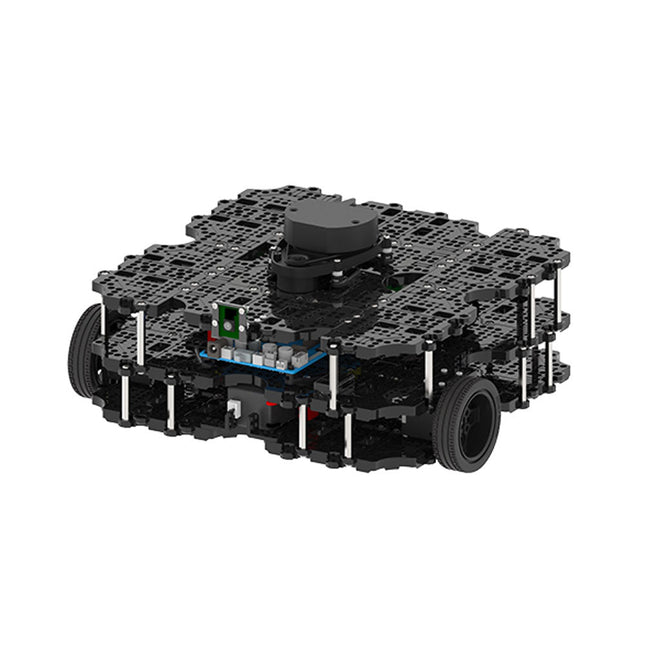
Robotis Robotis TurtleBot3 Waffle Pi (incl. Raspberry Pi 4)
World’s Most Popular ROS PlatformTurtleBot is the most popular open source robot for education and research. The new generation TurtleBot3 is a small, low cost, fully programmable, ROS based mobile robot. It is intended to be used for education, research, hobby and product prototyping.Affordable CostTurtleBot was developed to meet the cost-conscious needs of schools, laboratories and companies. TurtleBot3 is the most affordable robot among the SLAM-able mobile robots equipped with a 360° Laser Distance Sensor LDS-01.ROS StandardThe TurtleBot brand is managed by Open Robotics, which develops and maintains ROS. Nowadays, ROS has become the go-to platform for all the roboticists around the world. TurtleBot can be integrated with existing ROS-based robot components, but TurtleBot3 can be an affordable platform for whom want to get started learning ROS.ExtensibilityTurtleBot3 encourages users to customize its mechanical structure with some alternative options: open source embedded board (as a control board), computer and sensors. TurtleBot3 Waffle Pi is a two-wheeled differential drive type platform but it is able to be structurally and mechanically customized in many ways: Cars, Bikes, Trailers and so on. Extend your ideas beyond imagination with various SBC, sensors and motors on a scalable structure.Modular Actuator for Mobile RobotTurtleBot3 is able to get a precise spatial data by using 2 DYNAMIXEL’s in the wheel joints. DYNAMIXEL XM series can be operated by one of 6 operating modes (XL series: 4 operating modes): Velocity control mode for wheels, Torque control mode or Position control mode for joint, etc. DYNAMIXEL can be used even to make a mobile manipulator which is light but can be precisely controlled with velocity, torque and position control. DYNAMIXEL is a core component that makes TurtleBot3 perfect. It is easy to assemble, maintain, replace and reconfigure.Open Control Board for ROSThe control board is open-sourced in hardware wise and in software wise for ROS communication. The open source control board OpenCR1.0 is powerful enough to control not only DYNAMIXEL’s but also ROBOTIS sensors that are frequently being used for basic recognition tasks in cost effective way. Various sensors such as Touch sensor, Infrared sensor, Color sensor and a handful more are available. The OpenCR1.0 has an IMU sensor inside the board so that it can enhance precise control for countless applications. The board has 3.3 V, 5 V, 12 V power supplies to reinforce the available computer device lineups.Open SourceThe hardware, firmware and software of TurtleBot3 are open source which means that users are welcomed to download, modify and share source codes. All components of TurtleBot3 are manufactured with injection molded plastic to achieve low cost, however, the 3D CAD data is also available for 3D printing.Specifications Maximum translational velocity 0.26 m/s Maximum rotational velocity 1.82 rad/s (104.27 deg/s) Maximum payload 30 kg Size (L x W x H) 281 x 306 x 141 mm Weight (+ SBC + Battery + Sensors) 1.8 kg Threshold of climbing 10 mm or lower Expected operating time 2h Expected charging time 2h 30m SBC (Single Board Computers) Raspberry Pi 4 (2 GB RAM) MCU 32-bit ARM Cortex-M7 with FPU (216 MHz, 462 DMIPS) Remote Controller RC-100B + BT-410 Set (Bluetooth 4, BLE) Actuator XL430-W210 LDS (Laser Distance Sensor) 360 Laser Distance Sensor LDS-01 or LDS-02 Camera Raspberry Pi Camera Module v2.1 IMU Gyroscope 3 AxisAccelerometer 3 Axis Power connectors 3.3 V/800 mA5 V/4 A12 V/1 A Expansion pins GPIO 18 pinsArduino 32 pin Peripheral 3x UART, 1x CAN, 1x SPI, 1x I²C, 5x ADC, 4x 5-pin OLLO DYNAMIXEL ports 3x RS485, 3x TTL Audio Several programmable beep sequences Programmable LEDs 4x User LED Status LEDs 1x Board status LED1x Arduino LED1x Power LED Buttons and Switches 2x Push buttons, 1x Reset button, 2x Dip switch Battery Lithium polymer 11.1 V 1800 mAh / 19.98 Wh 5C PC connection USB Firmware upgrade via USB / via JTAG Power adapter (SMPS) Input: 100-240 VAC 50/60 Hz, 1.5 A @maxOutput: 12 VDC, 5 A Downloads ROS Robot Programming GitHub E-Manual Community
€ 1.879,00
Beste prijs
-

Elektor Digital Das CAN-Bus Praxisbuch (PDF)
Projekte mit Arduino Uno und Raspberry Pi In diesem Buch werden Anwendungen von Arduino Uno und Raspberry Pi 4 in praxisnahen Projekten auf Basis von CAN-Bus detailliert beschrieben. Durch den Einsatz von entweder Arduino Uno oder Raspberry Pi in Verbindung mit handelsüblichen CAN-Bus-Schnittstellenmodulen werden die Entwicklung, Fehlersuche und Fehlerbeseitigung sowie die Überprüfung von Projekten auf CAN-Bus-Basis erheblich erleichtert. Dieses Buch richtet sich an jeden, der mehr über den CAN-Bus lernen möchte und mit den Grundlagen der Elektronik vertraut ist. Hilfreich ist auch Erfahrung mit den Programmiersprachen C und Python sowie mit der Programmierung von Arduino Uno unter Verwendung seiner IDE und von Raspberry Pi zu haben. Das Buch ist eine nützliche Informationsquelle und ein Nachschlagewerk für jeden, der Antworten auf eine oder mehrere der folgenden Fragen sucht: Welche Bussysteme stehen für die Automobilindustrie zur Verfügung? Was sind die Grundprinzipien des CAN-Bus? Welche Arten von Frames (oder Datenpaketen) stehen in einem CAN-Bussystem zur Verfügung? Wie können Fehler in einem CAN-Bussystem erkannt werden, und wie zuverlässig ist ein CAN-Bussystem? Welche Arten von CAN-Bus-Controllern gibt es? Welches sind die Funktionsprinzipien des MCP2515 CAN-Bus-Controllers? Wie kann ich ein CAN-Bus-Projekt mit Arduino Uno realisieren? Wie kann ich Arduino oder Raspberry Pi CAN-Bus-Projekte mit 2 und 3 Knoten erstellen? Wie kann ich die Daten auf dem CAN-Bus analysieren? Wie kann ich ein CAN-Bus-Projekt mit Raspberry Pi ausführen?
€ 29,80
Leden: € 26,82


