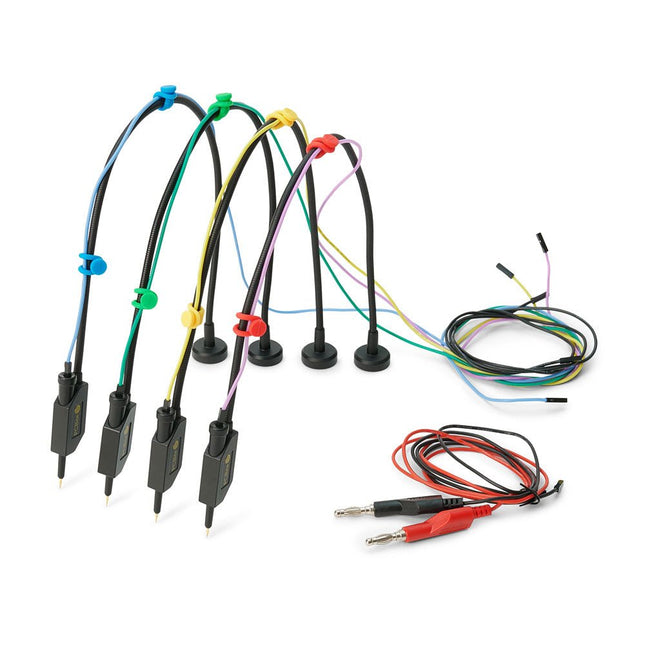
PCBite is the complete solution handling your circuit board during the development phase. Powerful magnets together with a stainless base plate makes the system flexible, mobile and user friendly. The holder can easily be repositioned to handle circuit boards of varying shape and sizes. The probes are steady but yet flexible made for instant measurements or total hands-free operations together with your multimeter or prefered tool. Included 4x PCBite holder 2x Banana to DuPont test wires red/black 2x SP10 probe with red/black probe head and pin tipped test needles 2x Extra crown tipped test needle 1x Set of yellow insulation washers 1x Large Baseplate (A4) 1x Microfiber cloth Downloads User Guide
The SQ series of handsfree PCBite probes from Sensepeek are insulated, come with included color-coded cable holders and have a lower point of gravity making them even more stable compared with the original SP series of probes. All the loved features of handsfree measurement, exchangeable fine pitch spring tipped test needle and the minimalistic design is maintained to make traditional sized and handheld probes obsolete. Features All handsfree probes from Sensepeek makes instant measurements or long triggering sessions a breeze. No more soldering wires to connect your probe or complicated tools to setup, just positioning the probe needle on any test point or component in the signal path and release. Saves time and frustration during development, verification and repairs. The minimalist design and the spring-loaded test needle makes it possible to simultaneously measure on fine pitch components and nearby signals. Both length and weight of the SQ probes are perfectly balanced to be used with PCBite PCB holders and base plate which is a must for handsfree function. The probe holder comes with a powerful magnet in the base, as for all PCBite probes and holders which makes the probe easy to place and reposition. The SQ series of probes can be used handheld without the probe holder as they have an insulated grip but their full potential is used when measuring handsfree. Included 4x SQ10 probes and pin tipped test needles (black) 2x Banana to dupont test wires (red/black) 5x Dupont to dupont test wires 1x Set of cable holders (4 colors) 4x Extra test needles Downloads User guide
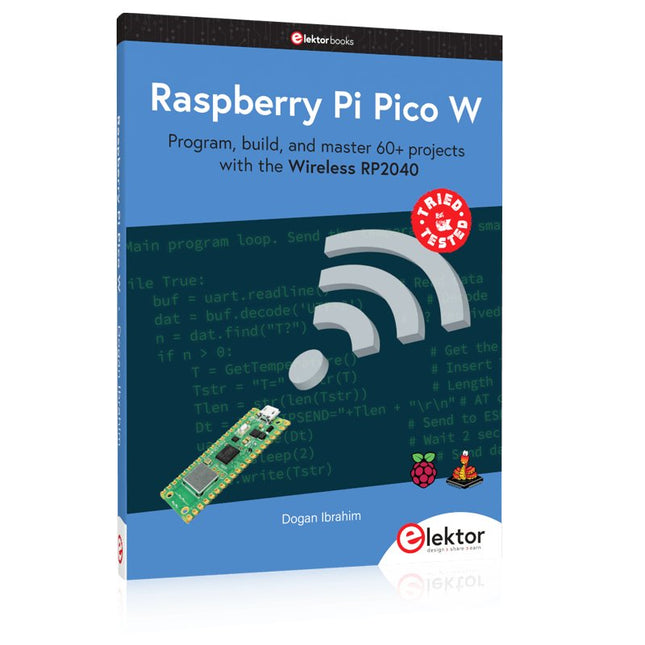
Program, build, and master 60+ projects with the Wireless RP2040
The Raspberry Pi Pico and Pico W are based on the fast, efficient, and low-cost dual-core ARM Cortex M0+ RP2040 microcontroller chip running at up to 133 MHz and sporting 264 KB of SRAM and 2 MB of Flash memory. Besides spacious memory, the Pico and Pico W offer many GPIO pins, and popular peripheral interface modules like ADC, SPI, I²C, UART, PWM, timing modules, a hardware debug interface, and an internal temperature sensor.
The Raspberry Pi Pico W additionally includes an on-board Infineon CYW43439 Bluetooth and Wi-Fi chipset. At the time of writing this book, the Bluetooth firmware was not yet available. Wi-Fi is however fully supported at 2.4 GHz using the 802.11b/g/n protocols.
This book is an introduction to using the Raspberry Pi Pico W in conjunction with the MicroPython programming language. The Thonny development environment (IDE) is used in all of the 60+ working and tested projects covering the following topics:
Installing the MicroPython on Raspberry Pi Pico using a Raspberry Pi or a PC
Timer interrupts and external interrupts
Analogue-to-digital converter (ADC) projects
Using the internal temperature sensor and external sensor chips
Using the internal temperature sensor and external temperature sensor chips
Datalogging projects
PWM, UART, I²C, and SPI projects
Using Bluetooth, WiFi, and apps to communicate with smartphones
Digital-to-analogue converter (DAC) projects
All projects are tried & tested. They can be implemented on both the Raspberry Pi Pico and Raspberry Pi Pico W, although the Wi-Fi-based subjects will run on the Pico W only. Basic programming and electronics experience are required to follow the projects. Brief descriptions, block diagrams, detailed circuit diagrams, and full MicroPython program listings are given for all projects.
De Andonstar AD407 Pro microscoop is geschikt voor diverse toepassingen, zoals het solderen van SMD's, of bij reparaties. De microscoop heeft een groot verstelbaar 7" LCD-scherm en wordt geleverd met een afstandsbediening. In vergelijking met de AD407 biedt de AD407 Pro een extra hoge standaard, wat het solderen van componenten nóg eenvoudiger maakt.
Specificaties
Schermgrootte
7 inch (17,8 cm)
Beeldsensor
4 MP
Video uitgang
UHD 2880x2160 (24 fps)FHD 1920x1080 (60 fps/30 fps)HD 1280x720 (120 fps)
Video formaat
MP4
Vergroting
Tot 270 keer (27 inch HDMI-monitor)
Foto resolutie
Max. 12 MP (4032x3024)
Foto formaat
JPG
Focus afstand
Min. 5 cm
Frame rate
Max. 120fps
Video interface
HDMI
Opslag
MicroSD-kaart (tot 64 GB)
Voeding
5 V DC
Verlichting
2 LED’s op de standaard
Afmetingen standaard
20 x 18 x 32 cm
Inbegrepen
1x Andonstar AD407 Pro Digital Microscope
1x Metalen standaard met 2 LED's
1x UV-filter (reeds gemonteerd in de lens)
1x IR-afstandsbediening
1x Switch kabel
1x Voedingsadapter
1x Instelsleutel
2x Metalen clips
1x HDMI-kabel
1x Manual
Downloads
Manual
Vergelijking modellen
AD407
AD407 Pro
AD409
AD409 Pro-ES
Schermgrootte
7 inch (17,8 cm)
7 inch (17,8 cm)
10,1 inch (25,7 cm)
10,1 inch (25,7 cm)
Beeldsensor
4 MP
4 MP
4 MP
4 MP
Video uitgang
2160p
2160p
2160p
2160p
Interfaces
HDMI
HDMI
USB, HDMI, WiFi
USB, HDMI, WiFi
Video formaat
MP4
MP4
MP4
MP4
Vergroting
Tot 270x
Tot 270x
Tot 300x
Tot 300x
Foto resolutie
Max. 4032x3024
Max. 4032x3024
Max. 4032x3024
Max. 4032x3024
Foto formaat
JPG
JPG
JPG
JPG
Focus afstand
Min. 5 cm
Min. 5 cm
Min. 5 cm
Min. 5 cm
Frame rate
Max. 120f/s
Max. 120f/s
Max. 120f/s
Max. 120f/s
Opslag
MicroSD-kaart
MicroSD-kaart
MicroSD-kaart
MicroSD-kaart
PC-ondersteuning
Nee
Nee
Windows
Windows
Ondersteuning mobiel
Nee
Nee
WiFi + Metingen
WiFi + Metingen
Voeding
5 V DC
5 V DC
5 V DC
5 V DC
Verlichting
2 LED's op de standaard
2 LED's op de standaard
2 LED's op de standaard
2 LED's op de standaard
Endoscoop
Nee
Nee
Nee
Ja
Afmetingen standaard
20 x 12 x 19 cm
20 x 18 x 32 cm
18 x 20 x 30 cm
18 x 20 x 32 cm
Gewicht
1,6 kg
2,1 kg
2,2 kg
2,5 kg
De OWON SDS1102 is een betaalbare benchtop digitale oscilloscoop die solide prestaties combineert met essentiële meetfuncties. Deze 2-kanaals oscilloscoop biedt een bandbreedte van 100 MHz, een sample rate van 1 GS/s, een 7-inch LCD-display en een geheugendiepte van 10 kpts. Daarmee is het een praktische keuze voor dagelijkse elektronicatests, foutopsporing en onderwijs.
De SDS1102 beschikt over een vereenvoudigd triggersysteem met niveau- en flanktriggering, waardoor gangbare signalen eenvoudig kunnen worden vastgelegd en geanalyseerd. Het apparaat is ontworpen voor toepassingen waarvoor geen grote geheugendiepte of geavanceerde triggerfuncties nodig zijn, en biedt een eenvoudige en kostenefficiënte oplossing voor basis-signaalanalyse.
Kenmerken
Bandbreedte: 100 MHz
2 kanalen
Bemonsteringssnelheid: 1 GS/s
Ultradunne behuizing
7-inch lcd met hoge resolutie
Ondersteuning voor SCPI en LabVIEW
Specificaties
Bandbreedte
100 MHz
Horizontale schaal (s/div)
5 ns/div - 1000 s/div
Kanalen
2
Verticale gevoeligheid
5 mV/div - 5 V/div (bij ingang)
DC Gain nauwkeurigheid
3%
Verticale resolutie (A/D)
8 bits (2 kanalen tegelijk)
Ingang
Ingangsimpedantie
1 MΩ, 10 pF
Ingangskoppeling
AC, DC, GND
Max ingangsspanning
± 400 V, CATI, CATII
Passieve probes
x1; 10
Probe verzwakkingsfactor
x1; x10; x100; x1000
Triggersysteem
Trigger mode
Auto, Normal, Single
Trigger type
Flank, Video
Flank triggerbron
CH1, CH2
Video trigger
Sampletype
Real-time
Samplefrequentie
1 GS/s
Equivalente samplesnelheid
No
Golflengte
10K pts
Interpolatie
sin(x)/x
Meet- en rekenkundig bewerkingssysteem
Automatische meting
Vpp, Vavg, RMS, Frequency, Period, Vmax, Vmin, Vtop, Vbase, Width, Overshoot, Pre-shoot Rise time, Fall time, +Width, -Width, +Duty, -Duty, Delay A->B, Delay A->B, area, cycle area
Rekenkundige functies
Addition, Subtraction, Multiplication, Division, FFT
Algemene kenmerken
Display maat
7" color LCD
Display resolutie
800 x 480
Voeding
100-240 V, 45-440 Hz, <15 W
Afmetingen
301 x 70 x 152 mm
Gewicht
1,1 kg
Inbegrepen
1x OWON SDS1102 Oscilloscoop
2x Oscilloscoopsonde
1x Sonde aanpassen
1x Netsnoer
1x USB-kabel
1x CD-Rom
1x Snelstartgids
Downloads
Quick Guide
Manual
PC Software
SCPI Commands
AI in Practice
Dive into the fascinating world of robotics and automation!
This Elektor Special shows you how to build your own robots with creativity, a little know-how, and affordable technology. From your first DIY project with Arduino or Raspberry Pi to intelligent systems with AI – this issue makes modern robotics understandable and accessible.
Discover practical instructions, inspiring projects, and exciting insights into the maker scene. Learn how experimentation, community, and openness give rise to true innovation – and why robotics is so much more than just a technical hobby.
Contents
Imagination turns into reality
Arduino-controlled Drawing Robot
GalaxyRVR Mars Rover Kit for Arduino
YDLIDAR X4Pro Lidar
xHuskyLens AI Camera
DOF Robot Arm with Raspberry Pi Pico
Manufacturing Robots with Fischertechnik
Pneumatic Industrial Robot
Why Do We Keep Building Robot Dogs?
Elektor Mini-Wheelie
Robot Vehicles and Autonomous Driving
Practical Low-Cost Methods for Reliable PCB Production
This book explains how to carry out reliable SMD assembly using affordable tools and small-scale equipment. It follows the complete workflow step by step, including tool selection, solder paste handling, stencil use, component placement, reflow methods, inspection, and rework.
The focus is on bench-level and small-lab production rather than industrial assembly lines. It shows practical methods for building single and double-sided SMD boards with repeatable results.
Topics include solder paste and flux, temperature profiles, hot air and hotplate techniques, small reflow ovens, inspection methods, and defect correction. Checklists and example workflows are included to help reduce errors and improve consistency.
Key features:
Tools and supplies for SMD assembly and rework
Solder paste types, storage, and handling
Stencils and paste application methods
Pick and place workflow and component orientation
Temperature profiles and reflow methods
Hot air, hotplate, and reflow oven processes
Inspection and quality control
Common defects such as tombstoning and solder bridges
Practical rework and component replacement
Bench-level professional workflows and checklists
This book is designed as a practical bench reference for anyone who wants to assemble and troubleshoot their own SMD boards with reliable results.
Elektor GREEN and GOLD members can download their digital edition here.
Not a member yet? Click here.
A Current Source for Testing (Z-)DiodesChecking Z-Diodes from 1 to 54 V @ 1 to 50 mA
ESD Strap TesterA Bench Tool with Pass, Borderline, and Fail Indication
Power Supply Transient Response TesterA Repeatable Step-Load Generator for Bench Power Supplies
Euclidean Sequencer Without a MicrocontrollerTrigger Patterns and CV Sequences with Simple CMOS Logic
LED Flashing Light for Gates and More with an Audible Alert
Need PCBs? The Elektor PCB Service Has You Covered.
Toothbrush TimerUsing a Tiny PIC
A Contactless Magnetic Combination LockWith the AS5600 Rotary Position Sensor
Low-Noise Battery-Powered PreamplifierFor Dynamic Microphones
The Arduino Nano TestLabMeasurement, Control, and Regulation
Rhythmic Bass LightEmphasize the Rhythm of Your Music
Low-Cut FilterNo Risk of Audio Feedback on Your System
Precise 1 Hz Square Wave Generator for BreadboardsA Reliable CMOS-Based Clock Source
555 Upside DownDuty Cycles Down to Zero
From Halfgeleidergids to Circuit Specials65 Years of Electronics Innovation
Electrical IsolationCAN Interface with Digital Isolator and Power Module
SpongillatorA Sponge-Based Oscillator
True Random Number GeneratorWith Integrated Chi-Square Test
3D Viewer for HTML pagesSimple, and Almost Without Code
Programming with TLScriptA Scripting Language for Measurement, Testing, and Control
Circuit Design: Tips from Experts
FeedbackWhat Is It and Why Is It Important?
One Board, Endless Ideas: Arduino UNO QFrom Retro Gaming to Real-Time Environmental Monitoring
How to Fix a Donut Antenna
Standby KillerA Real On/Off Switch for Your TV
Battery TestingMeasuring Batteries with the Arduino Nano
Power Supply for Audio Power AmplifiersA Good Power Supply Without Mains Hum
Prototyping Boards for RFFast Setups with DIY Prototyping Boards
T3 Surge ProtectionA Type 3 Spike Suppressor for Your Sensitive Equipment
IoT Room Thermostat BoardWith ESP32-C3/S3-Based Xiao MCU module
From Rigid to SmartFlexible and Printed Electronics — Between Vision and Industrial Reality
Learn to Build Intelligent Embedded Systems
Build smarter embedded systems with Arduino UNO Q. This book gives you the tools, knowledge, and confidence to turn ideas into intelligent, working solutions using the Arduino UNO Q platform. Discover how to build intelligent embedded systems with the Arduino UNO Q and AI.
Unlock the full potential of the Arduino UNO Q, a next-generation platform that combines the real-time power of the STM32U585 microcontroller with the flexibility of a Qualcomm Dragonwing QRB2210 microprocessor.
Learn how to rapidly prototype real-world applications using the Arduino IDE for low-level embedded control and Python in Arduino App Lab for high-level development.
Build confidence through hands-on projects that guide you step by step from basic board features to complete working systems.
Explore ready-to-use, AI based Arduino App Lab examples and see how they can jump-start your development and reduce time to deployment.
Step into the world of Edge AI with a clear, practical introduction to Edge Impulse Studio—no prior AI experience required.
Follow a complete, real-world workflow to create a Keyword Spotting AI application, covering data collection, model training, optimization, and on-device inference using the Edge Impulse Studio.
Bridge the gap between embedded systems and machine learning and learn how to bring intelligence directly onto your hardware.
Perfect for embedded engineers, educators, students, and makers looking to stay ahead in AI-enabled product development.
Onderzoek je schakelingen met hoge precisie en soldeer zelfs de kleinste SMD's en onderdelen zonder problemen.
Features
De multifunctionele HDMI Digitale Microscoop heeft Full HD, comfortabele beeldschermruimte, een verbeterde ergonomie, meerdere uitgangssignalen met verschillende resoluties.
De kantelhoek van de brede LCD monitor is instelbaar.
Wordt geleverd met afstandsbediening.
Kan als zelfstandig apparaat worden gebruikt.
Specificaties
Beeldscherm
7 inch (17,8 cm)
Beeldsensor
4 MP
Video output
UHD 2880x2160 (24fps)FHD 1920x1080 (60fps/30fps)HD 1280x720 (120fps)
Video formaat
MP4
Vergrotingsfactor
Tot 270 keer (27 inch HDMI monitor)
Foto resolutie
Max. 12 MP (4032x3024)
Foto formaat
JPG
Focus bereik
Min. 5 cm
Frame snelheid
Max. 120 fps (onder 600 Lux helderheid & HDP120)
Video interface
HDMI
Opslag
microSD card (tot 32 GB)
Voeding
5 V DC
Lichtbron
2 LED's met standaard
Afmetingen
20 x 12 x 19 cm
Inbegrepen
1x Andonstar AD407 Digitale Microscoop
1x Metalen statief met 2 LED's
1x Optische beugel
1x UV-filter
1x IR afstandsbediening
1x Verloopkabel
1x Voedingsadapter
1x HDMI kabel
2x Schroeven
1x Schroevendraaier
1x Gebruiksaanwijzing
Downloads
Manual
Model vergelijking
AD407
AD407 Pro
AD409
AD409 Pro-ES
Screen size
7 inch (17,8 cm)
7 inch (17,8 cm)
10,1 inch (25,7 cm)
10,1 inch (25,7 cm)
Image sensor
4 MP
4 MP
4 MP
4 MP
Video output
2160p
2160p
2160p
2160p
Interfaces
HDMI
HDMI
USB, HDMI, WiFi
USB, HDMI, WiFi
Video format
MP4
MP4
MP4
MP4
Magnification
Up to 270x
Up to 270x
Up to 300x
Up to 300x
Photo resolution
Max. 4032x3024
Max. 4032x3024
Max. 4032x3024
Max. 4032x3024
Photo format
JPG
JPG
JPG
JPG
Focus distance
Min. 5 cm
Min. 5 cm
Min. 5 cm
Min. 5 cm
Frame rate
Max. 120f/s
Max. 120f/s
Max. 120f/s
Max. 120f/s
Storage
microSD card
microSD card
microSD card
microSD card
PC support
No
No
Windows
Windows
Mobile connection
No
No
WiFi + Measurement
WiFi + Measurement
Power source
5 V DC
5 V DC
5 V DC
5 V DC
Light source
2 LEDs with the stand
2 LEDs with the stand
2 LEDs with the stand
2 LEDs with the stand
Endoscope
No
No
No
Yes
Stand size
20 x 12 x 19 cm
20 x 18 x 32 cm
18 x 20 x 30 cm
18 x 20 x 32 cm
Weight
1,6 kg
2,1 kg
2,2 kg
2,5 kg
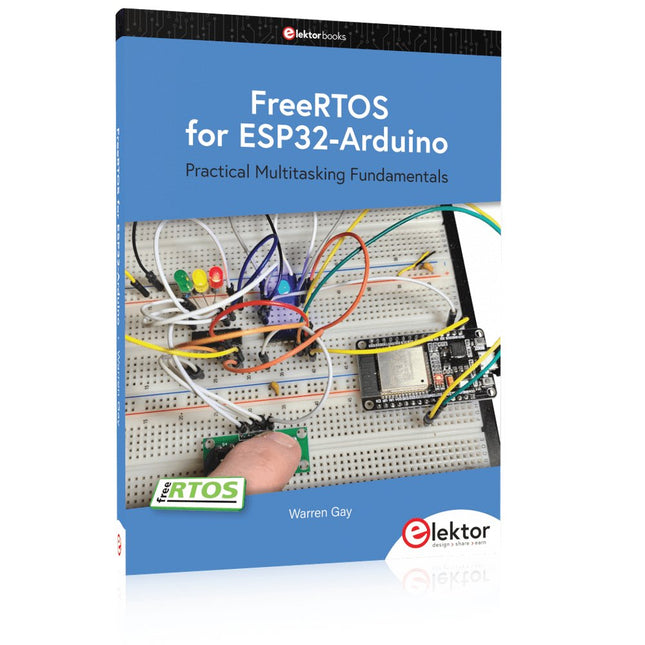
Practical Multitasking Fundamentals
Programming embedded systems is difficult because of resource constraints and limited debugging facilities. Why develop your own Real-Time Operating System (RTOS) as well as your application when the proven FreeRTOS software is freely available? Why not start with a validated foundation?
Every software developer knows that you must divide a difficult problem into smaller ones to conquer it. Using separate preemptive tasks and FreeRTOS communication mechanisms, a clean separation of functions is achieved within the entire application. This results in safe and maintainable designs.
Practicing engineers and students alike can use this book and the ESP32 Arduino environment to wade into FreeRTOS concepts at a comfortable pace. The well-organized text enables you to master each concept before starting the next chapter. Practical breadboard experiments and schematics are included to bring the lessons home. Experience is the best teacher.
Each chapter includes exercises to test your knowledge. The coverage of the FreeRTOS Application Programming Interface (API) is complete for the ESP32 Arduino environment. You can apply what you learn to other FreeRTOS environments, including Espressif’s ESP-IDF. The source code is available from GitHub. All of these resources put you in the driver’s seat when it is time to develop your next uber-cool ESP32 project.
What you will learn:
How preemptive scheduling works within FreeRTOS
The Arduino startup “loopTask”
Message queues
FreeRTOS timers and the IDLE task
The semaphore, mutex, and their differences
The mailbox and its application
Real-time task priorities and its effect
Interrupt interaction and use with FreeRTOS
Queue sets
Notifying tasks with events
Event groups
Critical sections
Task local storage
The gatekeeper task