
Zoekresultaten voor "antenna"
-
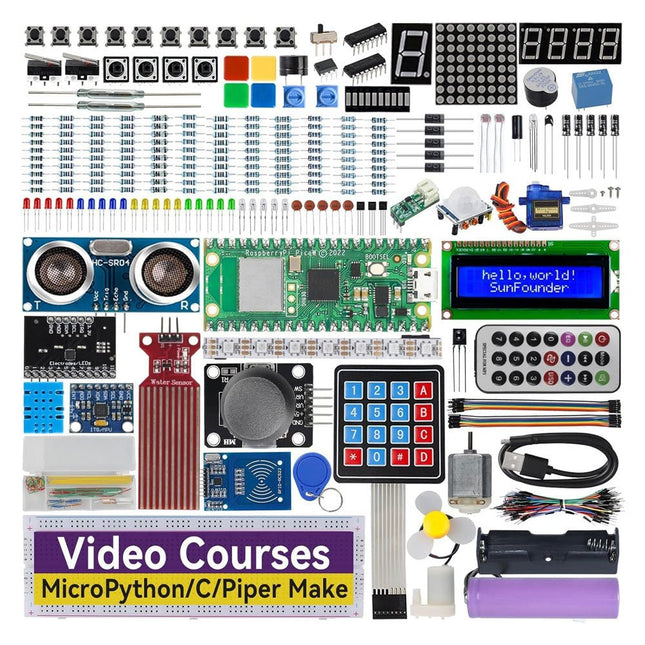
SunFounder SunFounder Kepler Kit (Ultimate Starter Kit voor Raspberry Pi Pico W)
Uw toegangspoort tot IoT en programmeren met microcontrollers Met 450+ componenten en 117 online projecten, stimuleert deze uitgebreide kit uw creativiteit. De tutorials van Paul McWhorter maken leren leuk voor beginners en gevorderde gebruikers. Deze kit ondersteunt MicroPython, C/C++ en Piper Make, en biedt diverse programmeeropties. Ontdek sensoren, actuatoren, LED's en LCD's voor eindeloze projectmogelijkheden. Van huisautomatisering tot robotica, deze kit versterkt uw technische reis. Kenmerken IoT Starter Kit voor beginners: Deze kit biedt een rijke IoT-leerervaring voor beginners. Met 450+ componenten, 117 projecten en door experts geleide videolessen, maakt deze kit het leren van microcontrollerprogrammering en IoT boeiend en toegankelijk. Door experts geleide videolessen: De kit bevat 27 videotutorials van de bekende docent Paul McWhorter. Zijn boeiende stijl vereenvoudigt complexe concepten, wat zorgt voor een effectieve leerervaring in microcontrollerprogrammering. Breed scala aan hardware: De kit bevat een divers scala aan componenten zoals sensoren, actuatoren, LED's, LCD's en meer, waardoor u kunt experimenteren en verschillende projecten kunt maken met de Raspberry Pi Pico W. Ondersteunt meerdere talen: De kit biedt veelzijdigheid met ondersteuning voor drie programmeertalen – MicroPython, C/C++ en Piper Make, wat zorgt voor een gevarieerde programmeerleerervaring. Toegewijde ondersteuning: Profiteer van onze voortdurende assistentie, inclusief een communityforum en tijdige technische hulp voor een naadloze leerervaring. Inbegrepen Raspberry Pi Pico W Breadboard Jumper Wires Weerstand Transistor Condensator Diode Li-po-oplaadmodule 74HC595 TA6586 – Motordriverchip LED RGB-LED LED-staafdiagram Weergave met 7 segmenten 4-cijferige 7-segmentweergave LED-dotmatrix I²C LCD1602 WS2812 RGB-strip met 8 LED's Zoemer DC-motor Servo DC-water Pomp Relais Knop Microschakelaar Schuifschakelaar Potentiometer Infraroodontvanger Joystickmodule 4x4 toetsenbord MPR121-module MFRC522-module Fotoweerstand Thermistor Kantelschakelaar Reedschakelaar PIR-bewegingssensormodule Waterniveausensormodule Ultrasone module DHT11-vochtigheidssensor MPU6050-module Documentatie Online tutorials in 3 talen (EN, DE en JP)
-

NXP Semiconductors NXP FRDM-MCXN947 Development Board
The FRDM-MCXN947 is a compact and versatile development board designed for rapid prototyping with MCX N94 and N54 microcontrollers. It features industry-standard headers for easy access to the MCU's I/Os, integrated open-standard serial interfaces, external flash memory, and an onboard MCU-Link debugger. Specificaties Microcontroller MCX-N947 Dual Arm Cortex-M33 cores @ 150 MHz each with optimized performance efficiency, up to 2 MB dual-bank flash with optional full ECC RAM, External flash Accelerators: Neural Processing Unit, PowerQuad, Smart DMA, etc. Memory Expansion *DNP Micro SD card socket Connectivity Ethernet Phy and connector HS USB-C connectors SPI/I²C/UART connector (PMOD/mikroBUS, DNP) WiFi connector (PMOD/mikroBUS, DNP) CAN-FD transceiver Debug On-board MCU-Link debugger with CMSIS-DAP JTAG/SWD connector Sensor P3T1755 I³C/I²C Temp Sensor, Touch Pad Expansion Options Arduino Header (with FRDM expansion rows) FRDM Header FlexIO/LCD Header SmartDMA/Camera Header Pmod *DNP mikroBUS User Interface RGB user LED, plus Reset, ISP, Wakeup buttons Inbegrepen 1x FRDM-MCXN947 Development Board 1x USB-C Cable 1x Quick Start Guide Downloads Datasheet Block diagram
-

Elektor Publishing KiCad Like A Pro – Advanced Projects and Recipes
Mastering PCB design with real-world projects This book builts on KiCad Like a Pro – Fundamentals and Projects and aims to help you practice your new KiCad skills by challenging you in a series of real-world projects. The projects are supported by a comprehensive set of recipes with detailed instructions on how to achieve a variety of simple and complex tasks. Design the PCBs for a solar power supply, an LED matrix array, an Arduino-powered datalogger, and a custom ESP32 board. Understand the finer details of the interactive router, how to manage KiCad project teams with Git, how to use an autorouter on 2 and 4-layer PCBs, and much more. KiCad 8 is a modern, cross-platform application suite built around schematic and design editors. This stable and mature PCB tool is a perfect fit for electronic engineers and makers. With KiCad 8, you can create PCBs of any complexity and size without the constraints associated with the commercial packages. Here are the most significant improvements and features in KiCad 8, both over and under the hood: Modern user interface, completely redesigned from earlier versions Improved and customizable electrical and design rule checkers Theme editor allowing you to fully customize the look of KiCad on your screen Ability to import projects from Eagle, CADSTART, and more An improved and tightly integrated SPICE circuit simulator Autorouting with the Freerouting plugin Filters define which elements of a layout are selectable Enhanced interactive router helps you draw single tracks and differential pairs with precision New or enhanced tools to draw tracks, measure distances, tune track lengths, etc. Enhanced tool for creating filled zones A customizable coordinate system facilitates data exchange with other CAD applications Realistic ray-tracing capable 3D viewer Differential pair routing Rich repositories of symbol, footprint, and 3D shape libraries Python scripting API for programmatic customization and extensions Improved footprint wizard for fast custom footprints

