
Zoekresultaten voor "arduino OR giga OR r1 OR wifi"
-

Elektor Digital Ultimate Arduino Uno Hardware Manual (E-book)
A Reference and User Guide for the Arduino Uno Hardware and Firmware A manual providing up-to-date hardware information for the popular Arduino Uno, the easy to use open-source electronics platform used by hobbyists, makers, hackers, experimenters, educators and professionals. Get all the information that you need on the hardware and firmware found on Arduino Uno boards in this handy reference and user guide. ldeal for the workbench or desktop Contains all of the Arduino Uno hardware information in one place Covers Arduino / Genuino Uno revision 3 and earlier boards Easily find hardware technical specifications with explanations Pin reference chapter with interfacing examples Diagrams and illustrations for easy reference to alternate pin functions and hardware connections Learn to back up and restore firmware on the board, or load new firmware Basic fault finding and repair procedures for Arduino Uno boards Power supply circuits simplified and explained Mechanical dimensions split into five easy to reference diagrams Contains circuit diagrams, parts list and board layout reference to easily locate components
€ 29,95
Leden: € 26,96
-

Elektor Digital C Programming with Arduino (E-book)
Technology is constantly changing. New microcontrollers become available every year. The one thing that has stayed the same is the C programming language used to program these microcontrollers. If you would like to learn this standard language to program microcontrollers, then this book is for you! Arduino is the hardware platform used to teach the C programming language as Arduino boards are available worldwide and contain the popular AVR microcontrollers from Atmel. Atmel Studio is used as the development environment for writing C programs for AVR microcontrollers. It is a full-featured integrated development environment (IDE) that uses the GCC C software tools for AVR microcontrollers and is free to download. At a glance: Start learning to program from the very first chapter No programming experience is necessary Learn by doing – type and run the example programs A fun way to learn the C programming language Ideal for electronic hobbyists, students and engineers wanting to learn the C programming language in an embedded environment on AVR microcontrollers Use the free full-featured Atmel Studio IDE software for Windows Write C programs for 8-bit AVR microcontrollers as found on the Arduino Uno and MEGA boards Example code runs on Arduino Uno and Arduino MEGA 2560 boards and can be adapted to run on other AVR microcontrollers or boards Use the AVR Dragon programmer/debugger in conjunction with Atmel Studio to debug C programs
€ 39,95
Leden: € 35,96
-

Elektor Digital FreeRTOS for ESP32-Arduino (E-book)
Practical Multitasking Fundamentals Programming embedded systems is difficult because of resource constraints and limited debugging facilities. Why develop your own Real-Time Operating System (RTOS) as well as your application when the proven FreeRTOS software is freely available? Why not start with a validated foundation? Every software developer knows that you must divide a difficult problem into smaller ones to conquer it. Using separate preemptive tasks and FreeRTOS communication mechanisms, a clean separation of functions is achieved within the entire application. This results in safe and maintainable designs. Practicing engineers and students alike can use this book and the ESP32 Arduino environment to wade into FreeRTOS concepts at a comfortable pace. The well-organized text enables you to master each concept before starting the next chapter. Practical breadboard experiments and schematics are included to bring the lessons home. Experience is the best teacher. Each chapter includes exercises to test your knowledge. The coverage of the FreeRTOS Application Programming Interface (API) is complete for the ESP32 Arduino environment. You can apply what you learn to other FreeRTOS environments, including Espressif’s ESP-IDF. The source code is available from GitHub. All of these resources put you in the driver’s seat when it is time to develop your next uber-cool ESP32 project. What you will learn: How preemptive scheduling works within FreeRTOS The Arduino startup “loopTask” Message queues FreeRTOS timers and the IDLE task The semaphore, mutex, and their differences The mailbox and its application Real-time task priorities and its effect Interrupt interaction and use with FreeRTOS Queue sets Notifying tasks with events Event groups Critical sections Task local storage The gatekeeper task
€ 39,95
Leden: € 35,96
-
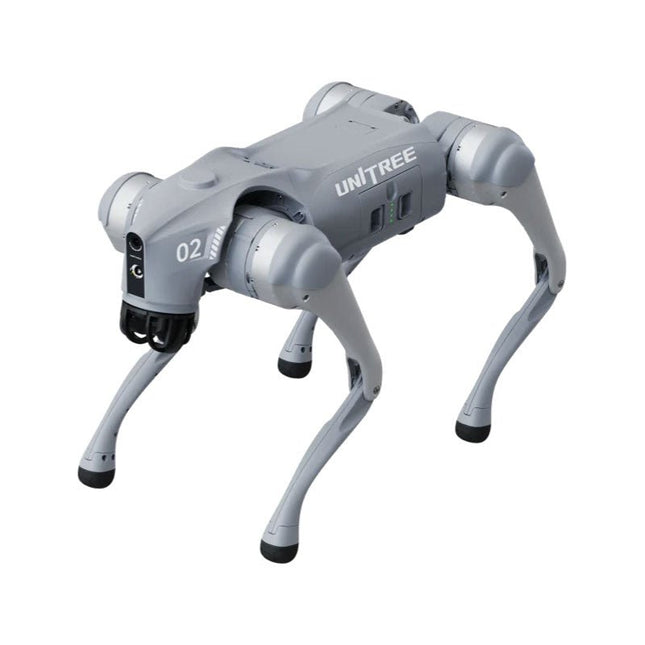
Unitree Unitree Go2 Pro Viervoetige Robot
Tijdelijke vertraging in de levering van Unitree-robots Op dit moment ervaren wij, net als andere leveranciers, vertragingen in de levering van Unitree-robots. Een zending van onze leverancier staat vast bij de douane, waardoor we eerder geplaatste bestellingen later kunnen uitleveren dan gepland. We werken hier actief aan samen met onze leverancier en verwachten op korte termijn meer duidelijkheid, maar kunnen helaas geen garanties geven. Ook een nieuwe zending is onderweg, maar deze zal nog enige tijd op zich laten wachten. Omdat andere leveranciers met dezelfde uitdagingen te maken hebben, is overstappen naar een andere partij momenteel geen snellere oplossing. Onze prioriteit ligt bij het uitleveren van bestaande bestellingen. Mocht je vragen hebben of je bestelling willen aanpassen, neem dan gerust contact op met onze customer service. We houden je op de hoogte van verdere ontwikkelingen. Bedankt voor je geduld en vertrouwen! De Unitree Go2-serie bestaat uit viervoetige robots voor onderzoek en ontwikkeling van autonome systemen op het gebied van mens-robotinteractie (HRI), SLAM en transport. Dankzij de vier poten en de 12DOF kan deze robot op verschillende terreinen uit de voeten. De Go2 is uitgerust met een geperfectioneerd aandrijf- en energiebeheersysteem, dat een snelheid (afhankelijk van de uitvoering) tot 3,7 m/s of 11,88 km/u mogelijk maakt met een gebruiksduur tot 4 uur. Bovendien hebben de motoren een koppel van 45 Nm op het lichaam/dijen en de knieën, wat ook sprongen of backflips mogelijk maakt. Kenmerken Superherkenningssysteem: 4D LIDAR L1 Maximale loopsnelheid: ca. 5 m/s Maximale gewrichtskracht: ca. 45 Nm Draadloze module: WiFi 6/Bluetooth/4G Ultralange batterijduur: ca. 2-4 uur (lange batterijduur gemeten in de praktijk) Intelligent zijvolgsysteem: ISS 2.0 Specificaties Trackingmodule: Op afstand bestuurbaar of automatisch volgen Frontcamera: Beeldoverdrachtsresolutie 1280x720, gezichtsveld 120°, ultragroothoeklens voor rijke helderheid Frontlamp: Verlicht de weg voor u helder 4D LiDAR L1: 360° x 90° omnidirectionele ultragroothoekscanning maakt automatisch vermijden mogelijk met een kleine dode hoek en stabiele werking 12 kniegewrichtmotoren: Sterk en krachtig, mooi en eenvoudig, gloednieuwe visuele ervaring Intercommicrofoon: Effectieve communicatie zonder scenariobeperkingen Zelfoprollende riem: Gemakkelijk te dragen en te laden Stabieler, krachtiger met geavanceerde apparaten: 3D LiDAR, 4G ESIM-kaart, wifi 6 met dualband, Bluetooth 5.2 voor stabiele verbinding en bediening op afstand. Krachtige rekenkern: Bewegingscontroller, krachtige ARM-processor, verbeterde AI-algoritmeprocessor, externe ORIN NX/NANO. Slimme batterij: Standaard 8000 mAh-batterij, duurzame 15000 mAh-batterij, bescherming tegen oververhitting, overladen en kortsluiting. Luidspreker voor het afspelen van muziek: Luister naar muziek wanneer u dat wilt. Unitree Go2 varianten De Go2 overtuigt niet alleen met zijn technische mogelijkheden, maar ook met een modern en slank design dat hem een futuristische uitstraling geeft en een echte blikvanger maakt. De Go2 Air is speciaal ontworpen voor demo's en presentaties. Met zijn basisfuncties biedt hij een solide basis voor het demonstreren van de bewegingsmogelijkheden en functionaliteit van een viervoetige robot. Belangrijk: De Go2 Air wordt geleverd zonder controller. Deze is optioneel verkrijgbaar. Met een krachtige 8-core high-performance CPU bieden de Pro en Edu de indrukwekkende rekenkracht die nodig is voor complexe taken en veeleisende berekeningen. Dit maakt snellere en efficiëntere gegevensverwerking mogelijk en maakt de Pro en Edu een betrouwbare partner voor uw projecten. Vanaf de Edu-versie is de Go2 programmeerbaar en biedt hij eindeloze mogelijkheden voor het ontwikkelen en onderzoeken van uw eigen roboticatoepassingen. De Go2 kan ook een staphoogte tot 14 cm aan. Dit maakt het een ideaal hulpmiddel voor onderzoek, onderwijs en de instap in de wereld van robotica. De Go2 Edu wordt geleverd met een afstandsbediening die eenvoudige en intuïtieve bediening biedt. Je krijgt er ook een dockingstation bij met een indrukwekkende rekenkracht van 100 TOPS, dat is uitgerust met krachtige AI-algoritmen en technische ondersteuning biedt. De Go2 Edu is uitgerust met een krachtige accu van 15.000 mAh, goed voor een indrukwekkende gebruiksduur tot wel 4 uur. Deze lange gebruiksduur stelt de robot in staat om langere verkenningsmissies uit te voeren en veeleisende taken te voltooien. Modelvergelijking Air Pro Edu/Edu Plus Afmetingen (staand) 70 x 31 x 40 cm 70 x 31 x 40 cm 70 x 31 x 40 cm Afmetingen (hurkend) 76 x 31 x 20 cm 76 x 31 x 20 cm Materiaal Aluminiumlegering + zeer sterke technische kunststof Aluminiumlegering + zeer sterke technische kunststof Aluminiumlegering + zeer sterke technische kunststof kunststof Gewicht (met accu) ongeveer 15 kg ongeveer 15 kg ongeveer 15 kg Spanning 28~33,6 V 28~33,6 V Piekvermogen ongeveer 3000 W ongeveer 3000 W ongeveer 3000 W Laadvermogen ≈7 kg (MAX ~ 10 kg) ≈8 kg (MAX ~ 10 kg) ≈8 kg (MAX ~ 12 kg) Snelheid 0~2,5 m/s 0~3,5 m/s 0~3,7 m/s (MAX ~ 5 m/s) Maximale klim- en valhoogte ongeveer 15 cm ongeveer 16 cm ongeveer 16 cm Maximale klimhoek 30° 40° 40° Basisrekenkracht N.v.t. 8-core High-performance CPU 8-core high-performance CPU Aluminium kniegewrichtsmotor 12 stuks 12 stuks 12 stuks Intra-gewrichtscircuit (knie) ✓ ✓ ✓ Heatpipe-koeler ✓ ✓ ✓ Bewegingsbereik Behuizing: -48~48° Lichaam: -48~48° Lichaam: -48~48° Dij: -200°~90° Dij: -200°~90° Dij: -200°~90° Schacht: -156°~-48° Schacht: -156°~-48° Schacht: -156°~-48° Maximaal koppel N.v.t. ongeveer 45 N.m ongeveer 45 N.m Supergroothoek 3D LiDAR ✓ ✓ Draadloze vectorpositionering Module N.v.t. ✓ ✓ HD-groothoekcamera ✓ ✓ Voeteinde-krachtsensor N.v.t. N.v.t. ✓ Basisactie ✓ ✓ ✓ Automatisch schalen band N.v.t. ✓ N.v.t. Verbeterde Intelligent OTA ✓ ✓ ✓ RTT 2.0 Beeldoverdracht ✓ ✓ ✓ App Basis Afstandsbediening ✓ ✓ ✓ App Gegevensweergave ✓ ✓ ✓ App Grafisch Programma ✓ ✓ ✓ Koplamp (3 W) ✓ ✓ ✓ Wifi 6 met dualband ✓ ✓ ✓ Bluetooth 5.2/4.2/2.1 ✓ ✓ ✓ 4G-module N.v.t. CN/GB CN/GB Spraakfunctie N.v.t. ✓ ✓ Muziek afspelen N.v.t. ✓ ✓ ISS 2.0 Intelligent zijvolgsysteem N.v.t. ✓ ✓ Intelligente detectie en vermijding ✓ ✓ ✓ Secundaire ontwikkeling N/A N/A ✓ Handmatige controller Optioneel Optioneel ✓ Module met hoge rekenkracht N.v.t. N.v.t. Edu: TOP 40 rekenkracht Edu Plus: TOP 100 rekenkracht NVIDIA Jetson Orin (optioneel) Slimme batterij Standaard (8000 mAh) Standaard (8000 mAh) Lange batterijduur (15000 mAh) Batterijduur 1-2 uur 1-2 uur 2-4 uur Oplader Standaard (33,6 V, 3,5 A) Standaard (33,6 V, 3,5 A) Snelladen (33,6 V, 9 A) Inbegrepen 1x Unitree Go2 Pro 1x Unitree Go2 batterij (8000 mAh) Downloads Documentation iOS/Android apps GitHub
€ 3.599,00
Beste prijs
-

Elektor Publishing Das CAN-Bus Praxisbuch
Projekte mit Arduino Uno und Raspberry Pi In diesem Buch werden Anwendungen von Arduino Uno und Raspberry Pi 4 in praxisnahen Projekten auf Basis von CAN-Bus detailliert beschrieben. Durch den Einsatz von entweder Arduino Uno oder Raspberry Pi in Verbindung mit handelsüblichen CAN-Bus-Schnittstellenmodulen werden die Entwicklung, Fehlersuche und Fehlerbeseitigung sowie die Überprüfung von Projekten auf CAN-Bus-Basis erheblich erleichtert. Dieses Buch richtet sich an jeden, der mehr über den CAN-Bus lernen möchte und mit den Grundlagen der Elektronik vertraut ist. Hilfreich ist auch Erfahrung mit den Programmiersprachen C und Python sowie mit der Programmierung von Arduino Uno unter Verwendung seiner IDE und von Raspberry Pi zu haben. Das Buch ist eine nützliche Informationsquelle und ein Nachschlagewerk für jeden, der Antworten auf eine oder mehrere der folgenden Fragen sucht: Welche Bussysteme stehen für die Automobilindustrie zur Verfügung? Was sind die Grundprinzipien des CAN-Bus? Welche Arten von Frames (oder Datenpaketen) stehen in einem CAN-Bussystem zur Verfügung? Wie können Fehler in einem CAN-Bussystem erkannt werden, und wie zuverlässig ist ein CAN-Bussystem? Welche Arten von CAN-Bus-Controllern gibt es? Welches sind die Funktionsprinzipien des MCP2515 CAN-Bus-Controllers? Wie kann ich ein CAN-Bus-Projekt mit Arduino Uno realisieren? Wie kann ich Arduino oder Raspberry Pi CAN-Bus-Projekte mit 2 und 3 Knoten erstellen? Wie kann ich die Daten auf dem CAN-Bus analysieren? Wie kann ich ein CAN-Bus-Projekt mit Raspberry Pi ausführen?
€ 34,80
Beste prijs
-

Elektor Digital Elektor Special: Einstieg in die Elektronik mit Arduino (PDF)
Der ideale Start für alle, die in die Welt der Elektronik und Mikrocontroller eintauchen möchten! Dieses Sonderheft vermittelt auf verständliche und praxisnahe Weise die Grundlagen der Elektronik – kombiniert mit spannenden Projekten rund um den beliebten Arduino. Statt trockener Theorie bietet dieses Heft viele leicht nachvollziehbare Experimente, die auf einem Steckboard und mit einem Arduino Uno umgesetzt werden können. So lernen Sie Schritt für Schritt, wie elektronische Bauteile funktionieren und wie Sie sie gezielt einsetzen, um eigene Projekte zu entwickeln. Enthaltene Projekte Strom & Spannung: Wie alles begann Arduino-Hardware Arduino-Programmierung Der Stromkreis Mit dem Multimeter messen Schaltpläne und Experimentier boards Schaltpläne erstellen Breadboard ansichten mit Fritzing Schaltungen online simulieren Unverzichtbar: Widerstände (Teil 1) Praxis mit Widerständen (Teil 2) Veränderliche Widerstände Dioden: Einbahnstraße für den Strom Der Transistor-Schalter Elektromagnetismus Relais und Motoren OpAmps: Operationsverstärker Kondensatoren Timer NE555 PWM und analoge Werte mit Arduino 7-Segment Temperatur anzeige Einführung ins Löten und LCDs
€ 11,90
Leden: € 10,71
-

Elektor Digital Kickstart to Arduino Nano (E-book)
Get Cracking with the Arduino Nano V3, Nano Every, and Nano 33 IoT The seven chapters in this book serve as the first step for novices and microcontroller enthusiasts wishing to make a head start in Arduino programming. The first chapter introduces the Arduino platform, ecosystem, and existing varieties of Arduino Nano boards. It also teaches how to install various tools needed to get started with Arduino Programming. The second chapter kicks off with electronic circuit building and programming around your Arduino. The third chapter explores various buses and analog inputs. In the fourth chapter, you get acquainted with the concept of pulse width modulation (PWM) and working with unipolar stepper motors. In the fifth chapter, you are sure to learn about creating beautiful graphics and basic but useful animation with the aid of an external display. The sixth chapter introduces the readers to the concept of I/O devices such as sensors and the piezo buzzer, exploring their methods of interfacing and programming with the Arduino Nano. The last chapter explores another member of Arduino Nano family, Arduino Nano 33 IoT with its highly interesting capabilities. This chapter employs and deepens many concepts learned from previous chapters to create interesting applications for the vast world of the Internet of Things. The entire book follows a step-by-step approach to explain concepts and the operation of things. Each concept is invariably followed by a to-the-point circuit diagram and code examples. Next come detailed explanations of the syntax and the logic used. By closely following the concepts, you will become comfortable with circuit building, Arduino programming, the workings of the code examples, and the circuit diagrams presented. The book also has plenty of references to external resources wherever needed. An archive file (.zip) comprising the software examples and Fritzing-style circuit diagrams discussed in the book may be downloaded free of charge below.
€ 29,95
Leden: € 26,96
-

Elektor Digital Elektor Special: Sensoren für Wetter und Umwelt (PDF)
Bauen Sie Ihre perfekte Wetterstation oder forschen Sie zusammen mit der ganzen Welt an Umweltdaten. Mit vielen praktischen Projekten für Arduino, Raspberry Pi, NodeMCU, ESP32 und weiteren Developmentboards. Wetterstationen erfreuen sich seit Jahrzehnten großer Beliebtheit. Ob in aktuellen oder längst eingestellten Elektronik-Magazinen – regelmäßig finden sich Beiträge zum Eigenbau einer Wetterstation. Im Laufe der Jahre wurden diese Systeme immer ausgefeilter und können heute nahtlos in das Smart Home integriert werden. Allerdings erfordert dies oft die Bindung an einen (teuren) Markenhersteller, der sämtliche Komponenten abdeckt. Mit Ihrer eigenen Wetterstation können Sie jedoch mühelos mithalten – und sogar Messwerte erfassen, die kommerzielle Geräte nicht bieten. Dabei kommt der Spaß nicht zu kurz: Sie erweitern spielerisch Ihr Wissen über Elektronik, moderne Mikrocontroller-Developmentboards und Programmiersprachen. Schon für weniger als zehn Euro können Sie erste Umweltdaten erfassen und Ihr System Schritt für Schritt mit wachsendem Interesse weiter ausbauen. Aus dem Inhalt: Wind und Wetter auf der Spur Wetterdisplay mit OpenWeatherMap und Vakuum-Fluoreszenzanzeige Flüchtige organische Verbindungen in der Atemluft Mit MQ-Sensoren arbeiten: Kohlenmonoxid messen – geruchlos aber extrem giftig CO2-Ampel mit ThingSpeak-IoT-Anbindung Ein Gießautomat für Ihre Pflanzen Gutes Raumklima: Temperatur und Luftfeuchtigkeit sind wichtige Kriterien Schickes Thermometer mit alter Röhrentechnik Nostalgisches Wetterhäuschen für die ganze Familie Luftdruck und Temperatur genau messen Sonnenbrand-Warngerät DIY-Sensor für die Sonnenscheindauer Das Smartphone zeigt’s an: Nebel oder klare Sicht? Erdbeben erkennen Pegelstände von Gewässern und Behältern pH-Wert von Gewässern bestimmen Radioaktive Strahlung erkennen Mit GPS wissen Sie weltweit, wo ihr Sensor ist Logdateien mit Zeitstempel auf SD-Karten speichern LoRaWAN, The Things Network und ThingSpeak LoRaWAN-Gateway für TTN betreiben Mega-Display mit Wettervorhersage
€ 11,90
Leden: € 10,71
-

Elektor Publishing Das 1-Wire-Praxisbuch
Das 1-Wire-Praxisbuch
€ 39,80
Beste prijs
-

Elektor Digital Controller Area Network Projects with ARM and Arduino (E-book)
This book details the use of the ARM Cortex-M family of processors and the Arduino Uno in practical CAN bus based projects. Inside, it gives a detailed introduction to the architecture of the Cortex-M family whilst providing examples of popular hardware and software development kits. Using these kits helps to simplify the embedded design cycle considerably and makes it easier to develop, debug, and test a CAN bus based project. The architecture of the highly popular ARM Cortex-M processor STM32F407VGT6 is described at a high level by considering its various modules. In addition, the use of the mikroC Pro for ARM and Arduino Uno CAN bus library of functions are described in detail. This book is written for students, for practising engineers, for hobbyists, and for everyone else who may need to learn more about the CAN bus and its applications. The book assumes that the reader has some knowledge of basic electronics. Knowledge of the C programming language will be useful in later chapters of the book, and familiarity with at least one microcontroller will be an advantage, especially if the reader intends to develop microcontroller based projects using CAN bus. The book should be useful source of reference to anyone interested in finding an answer to one or more of the following questions: What bus systems are available for the automotive industry? What are the principles of the CAN bus? What types of frames (or data packets) are available in a CAN bus system? How can errors be detected in a CAN bus system and how reliable is a CAN bus system? What types of CAN bus controllers are there? What are the advantages of the ARM Cortex-M microcontrollers? How can one create a CAN bus project using an ARM microcontroller? How can one create a CAN bus project using an Arduino microcontroller? How can one monitor data on the CAN bus?
€ 32,95
Leden: € 29,66
-

Elektor Digital Elektor November/December 2021 (PDF)
IMAGE PROCESSING WITH THE NVIDIA JETSON NANO (PART 2)Image Recognition Using Edge Impulse ELEKTOR JUMPSTARTER NEWSUpcoming Campaigns AN OPEN-SOURCE GPS TRACKING PLATFORMTraccar Maps Vehicle Tracking Without the Need for a Third-Party Cloud Server JOY-IT LCR-T7 MULTI-FUNCTION TESTERTesting Passives, Discrete Semiconductors and IR Remote Controls NOISE SYNTHESIZERFrom Noise to Music with the PRBSynth1 STARTING OUT IN ELECTRONICSEasier than Imagined! ... Continuing with the Coil UNDERSTANDING THE NEURONS IN NEURAL NETWORKS (PART 2)Logical Neurons ISSUES WITH SECURITY? FIGHT FIRE WITH FIRE!Flashbulb-Protected Analogue Memory Add-on For the Tamper-Evident Box LCR METER POSTER BLUETOOTH BEACONS IN PRACTICEBeacons Light the Way Ahead C PROGRAMMING ON RASPBERRY PICommunicating over Wi-Fi (Sample Chapter) EMC PRE-COMPLIANCE TEST FOR YOUR DC-POWERED PROJECT (PART 2)The Hardware and How to Use It HANDS ON THE PARALLAX PROPELLER 2 (PART 5)Inside the Smart Pin MODBUS OVER WLAN (PART 1)Hardware and Programming HOMELAB TOURSWhere the Junior Computer Is Brought to Life Again BUILD YOUR OWN HIGH-PRECISION CALIBRATOR-10 V to +10 V, 0 to 40 mA, 0.001% ARDUINO NANO RP2040 CONNECTRaspberry Pi RP2040 + Wi-Fi + Bluetooth THE PHYSICAL BODY OF ARTIFICIAL INTELLIGENCE ERR-LECTRONICSCorrections, Updates and Readers’ Letters CREATE GUIS WITH PYTHONIntroducing guizero CO2 METER KIT FOR THE CLASSROOMAn ESP8266-Based Device from the University of Applied Sciences Aachen NOSTALGIC MK484 MW/LW RADIO...Always Fun to Build! ELEKTOR @ 60Let There Be Light! HEXADOKUThe Original Elektorized Sudoku
€ 7,50
-
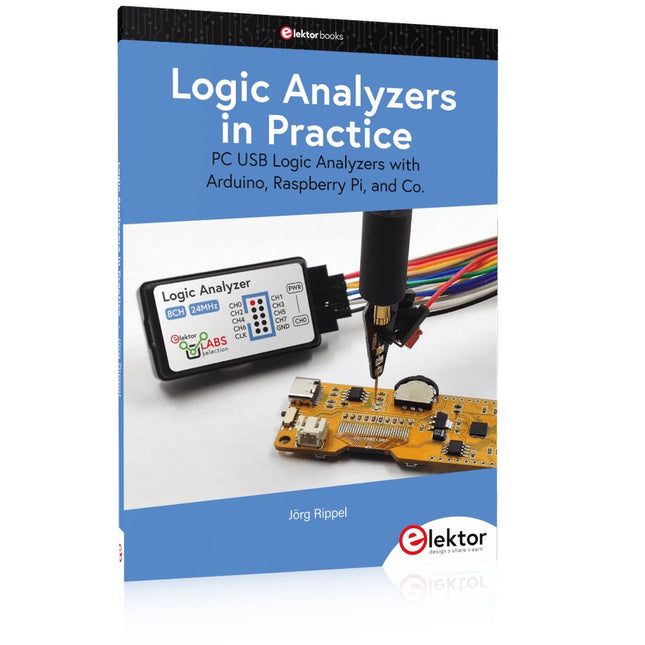
Elektor Publishing Logic Analyzers in Practice
PC USB Logic Analyzers with Arduino, Raspberry Pi, and Co. Step-by-step instructions guide you through the analysis of modern protocols such as I²C, SPI, UART, RS-232, NeoPixel, WS28xx, HD44780 and 1-Wire. With the help of numerous experimental circuits based on the Raspberry Pi Pico, Arduino Uno and the Bus Pirate, you will learn the practical application of popular USB logic analyzers. All the experimental circuits presented in this book have been fully tested and are fully functional. The necessary program listings are included – no special programming or electronics knowledge is required for these circuits. The programming languages used are MicroPython and C along with the development environments Thonny and Arduino IDE. This book uses several models of flexible and widely available USB logic analyzers and shows the strengths and weaknesses of each price range. You will learn about the criteria that matter for your work and be able to find the right device for you. Whether Arduino, Raspberry Pi or Raspberry Pi Pico, the example circuits shown allow you to get started quickly with protocol analysis and can also serve as a basis for your own experiments. After reading this book, you will be familiar with all the important terms and contexts, conduct your own experiments, analyze protocols independently, culminating in a comprehensive knowledge set of digital signals and protocols.
€ 34,95
Leden: € 31,46


