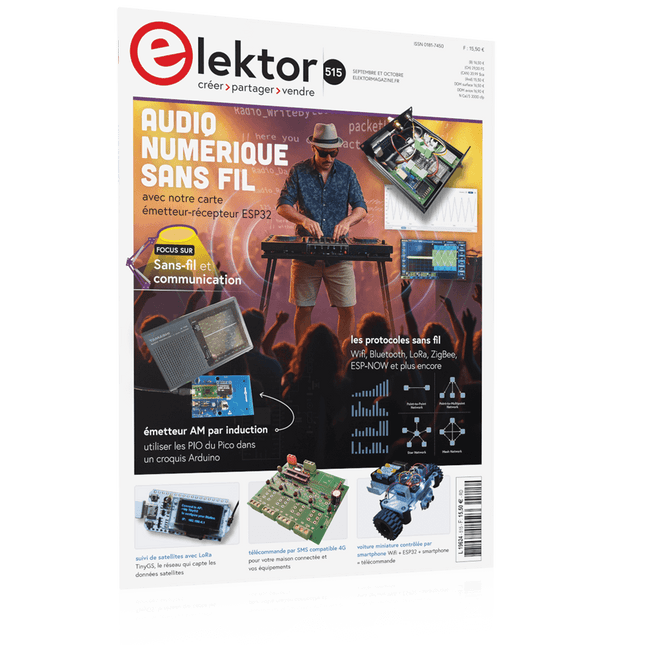
electronica Fast Forward Start- & Scale-Up AwardsLes préparatifs s'accélèrent !Bluetooth Low Energy avec ESP32-C3 et ESP32Vous n'avez pas toujours besoin de choisir le wifi !Renifleur BLEReconfiguration du dongle USB nRF52840 MDK de makerdiaryCube magique de LED RGBcircuit avec un RP2040Marche/arrêt automatique pour le compresseur de pâte à souderContenu vidéo d'ElektorLivestreams, webinaires et cours pour les ingénieurs et les fabricants professionnelsÉlectrification d'un véloUtilisation d'un kit de modification de vélo électriqueDémarer en électroniqueMultiplication de tensionsSur le vifTransmutationsTeensy 4.0 – comment cette carte peut-elle être aussi rapide ?Ou: La vitesse, ce n'est pas sorcier !Simulation d'amplificateur de puissance audio avec TINA« simuler avant de construire »Développer et utiliser vos nœuds LoRaWAN pour l'Internet des Objets (IdO)Exemple de chapitre : Modules LoRaWAN Dragino LHT65, LDS01 et LDS02Projet 2.0Corrections, mises à jour et courriers des lecteurs5G pour mon propre exploitMaîtrise totale du déploiement de la 5G avec les réseaux cellulaires privésInfographicsLes meilleurs conseils pour développer une interface WiFiComment mon appareil apprend-il à transmettre ?Horloge Tour du Rhin Mod 2Analyseur de spectre audio avec dekatronsUne nouvelle façon d'utiliser les tubes rétroEnvoi de données à TelegramAvec un ESP32 et quelques composantsFiltre coupe-bande de Fliege pour les mesures audioFaites de meilleures mesures avec un filtre coupe-bandeDémontage d'un CO2-mètrePeut-on le bidouiller pour vos projets ?Tout mis ensembleLe transistor unijonction programmable expliquéÉcran tactile rond pour Raspberry PiL'HyperPixel 2.1 Round de PimoroniTélémesure avec détection des pertes de connexionGrâce aux modules nRF24L01+Récepteur FM numérique avec Arduino et TEA5767Restez à l'écoute avec un Arduino NanoConvertir une interface OLED de SPI vers I²CHomeLab ToursUn passe-temps ne prend pas sa retraiteUne décennie d'éthique en électroniqueLe regard de Tessel Renzenbrink sur la société numérique.HexadokuThe Original Elektorized Sudoku
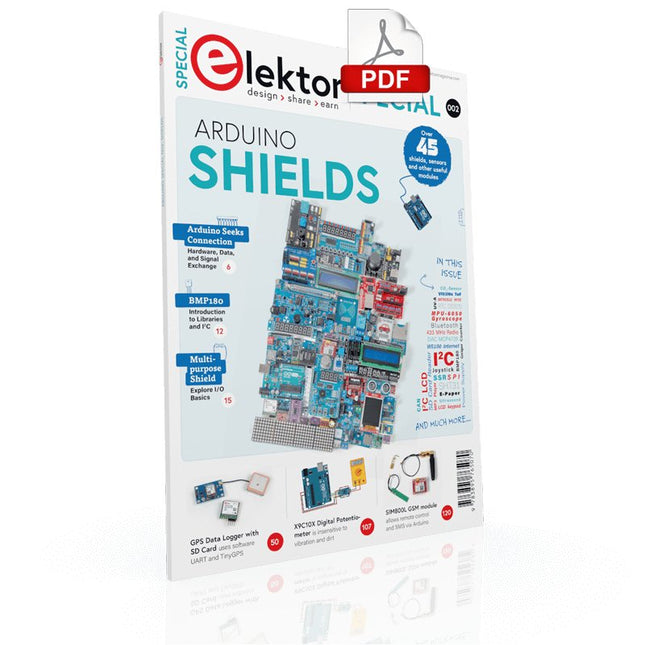
Make your project dreams come true: an odometer for the hamster wheel, a fully automatic control of your ant farm with web interface, or the Sandwich-O-Mat – a machine that toasts and grills sandwiches of your choice.
With the Arduino and the DIY or Maker movement, not only did entry into microcontroller programming become child's play, but a second development also took place: Resourceful developers brought small boards – so-called shields or modules – to the market, which greatly simplified the use of additional hardware. The small modules contain all the important electronic parts to be connected to the microcontroller with a few plug-in cables, eliminating the need for a fiddly and time-consuming assembly on the plug-in board. In addition, it is also possible to handle tiny components that do not have any connecting legs (so-called SMDs).
Projects Discussed
Arduino seeks connection
BMP and introduction to libraries, I²C
Learn I/O basics with the multi-purpose shield
I²C LCD adapter and DOT matrix displays
LCD keypad shield
Level converter
W5100: Internet connection
I/O expansion shield
Relays and solid-state relays
The multi-function shield: A universal control unit
Connecting an SD card reader via SPI
Keys and 7-segment displays
16-bit ADC
MCP4725 DAC
16-way PWM servo driver
MP3 player
GPS data logger using an SD card
Touch sensor
Joystick
SHT31: Temperature and humidity
VEML6070 UV-A sensor
VL53L0X time-of-flight
Ultrasonic distance meter
MAX7219-based LED DOT matrix display
DS3231 RTC
Port expander MCP23017
433 MHz radio
MPU-650 gyroscope
ADXL345 accelerometer
WS2812 RGB LEDs
Power supply
MQ-xx gas sensors
CO2 gas sensor
ACS712 current sensor
INA219 current sensor
L298 motor driver
MFRC522 RFID
28BYJ-48 stepper motor
TMC2209 silent step stick
X9C10x digital potentiometer
ST7735 in a color TFT display
e-Paper display
Bluetooth
Geiger counter
SIM800L GSM module
I²C multiplexer
Controller Area Network
Elektor GREEN and GOLD members can download their digital edition here.
Not a member yet? Click here.
Raspberry Pi Pico as Spectrum AnalyzerFFTs on a Low-Cost Hardware Basis
±40-V Linear Voltage RegulatorAn Alternative Power Supply for the Fortissimo-100 Power Amplifier… and Others!
MCU Wireless Communication Made FlexibleEEPROM Opens Networking Prospects for Wireless MCUs
€5,000 up for grabs!Join the STM32 Wireless Innovation Design Contest
2023: An AI OdysseyGetting Started with ChatGPT’s Code Interpreter
LoRa, a Swiss Army Knife (1)The LoRa Protocol and Its Advantages
Adjustable Current Sink with Integrated Clock GeneratorTest Power Supplies, Voltage Converters and Batteries
Two New Arduino UNO R4 Boards: Minima and WiFi
Logarithmic PotentiometersThey’re Exponential!
Motor Driver Breakout BoardA BoB for a 5 A DC Motor Driver with a 3×3 mm Size
From Life’s ExperienceHazardous Electronics
Is Cellular the Lowest-Power Option for IoT?LTE-M and NB-IoT Energy Requirements in LPWAN Deployments
Wireless Communication in IoT Systems – Using Arduino MKR ModulesThe Right Board for Wi-Fi, LoRa, and Many More Standards
AC Losses in Magnetic ComponentsAvoid Hot Inductors!
Measurement for Optimal Cloud Deployment
Matter Adoption: What does it take to deploy Matter devices?
YARD Stick OneA Sub-1 GHz Wireless Test Tool
Latching RelaysPeculiar Parts, the Series
PIC O’Clock – In Touch with TimeDesigning an SDR Time Signal Receiver
Due Diligence DirectiveBusiness as Usual Will Not Do
Starting Out in Electronics……Voltage Amplification
Infrasound Recorder with the Arduino Pro MiniA Sample Project from Elektor’s “Arduino & Co.” Book
Cloud-Based Energy MeterWith ESP32 Module and PZEM-004T Voltage/Current Sensor
A Bare-Metal Programming Guide (Part 2)Accurate Timing, the UART, and Debugging
Hexadoku
Elektor GREEN and GOLD members can download their digital edition here.
Not a member yet? Click here.
The ESP-BLASTA Mini ESP32 Rocket Drone That Flies 100 km/h+
Wireless Workshop (1)Radio Modules Unlocked: 433 MHz CC1101 Sub-GHz Transceiver
AM TransmitterWith Square/Sine Wave Generator on Raspberry Pi Pico
STM32Cube Innovation ChallengeCompete with Your Best STM32C5 Design
CoffeeCallerHow a Long Hallway Led to a Custom Mesh-Networked PCB
AudiotronicsTotal Harmonic Distortion
Elektor at 65Projects from Septembers and Octobers Past
Bluetooth Channel Sounding for Asset TrackingCentimeter-Level Precision Ranging for Next-Generation IoT
2026: An AI OdysseyQuantum Computing Is Not the Next GPU
Protecting the Cloud Demands Security at the Edge
First Experiences with the HackRF ProPractical Tests with the New SDR Hardware
Modem Upgrade from GPRS/2G to LTE/4GUsing a Wireless Alarm Control Panel as an Example
Loop Antenna with RF BricksPart 1: A DIY Shortwave Antenna with Adjustable Directivity
Internet Radio to AM ConverterUsing an ESP32-S3 as Transmitter
Err-lectronics
mioty — An OverviewFraunhofer’s Approach to LPWAN
Workbench WisdomPractical Tips from Experts
Walter, the Compact IoT ModulePart 2: Accessing Weather and Data Services
59 Experiments with Arduino IDE and Python
The main aim of this book is to teach the Arduino IDE and MicroPython programming languages in ESP32 based projects, using the highly popular ESP32 DevKitC development board. Many simple, basic, and intermediate level projects are provided in the book using the Arduino IDE with ESP32 DevKitC. All projects have been tested and work. Block diagrams, circuit diagrams, and complete program listings of all projects are given with explanations. In addition, several projects are provided for programming the ESP32 DevKitC using MicroPython. The projects provided in this book are designed to teach the following features of the ESP32 processor:
GPIOs
Touch sensors
External interrupts
Timer interrupts
I²C and I²S
SPI
PWM
ADC
DAC
UART
Hall sensor
Temperature sensor
Infrared controller
Reading and writing to SD card
Reading and writing to flash memory
RTC timer
Chip ID
Security and encryption
Wi-Fi and network programming
Bluetooth BLE programming
Communication mobile devices
Low power design
ESP-IDF programming
The projects have been organized with increasing levels of difficulty. Readers are encouraged to tackle the projects in the order given. A specially prepared hardware kit (SKU 18305) is available from Elektor. With the help of this hardware, it should be easy and fun to build the projects in this book.
STmicroelectronics’ wireless IoT & wearable sensor development kit
‘SensorTile.box’ is a portable multi-sensor circuit board housed in a plastic box and developed by STMicroelectronics. It is equipped with a high-performance 32-bit ARM Cortex-M4 processor with DSP and FPU, and various sensor modules, such as accelerometer, gyroscope, temperature sensor, humidity sensor, atmospheric pressure sensor, microphone, and so on. SensorTile.box is ready to use with wireless IoT and Bluetooth connectivity that can easily be used with an iOS or Android compatible smartphone, regardless of the level of expertise of the users. SensorTile.box is shipped with a long-life battery and all the user has to do is connect the battery to the circuit to start using the box.
The SensorTile.box can be operated in three modes: Basic mode, Expert mode, and Pro mode. Basic mode is the easiest way of using the box since it is pre-loaded with demo apps and all the user has to do is choose the required apps and display or plot the measured data on a smartphone using an app called STE BLE Sensor. In Expert mode users can develop simple apps using a graphical wizard provided with the STE BLE Sensor. Pro mode is the most complex mode allowing users to develop programs and upload them to the SensorTile.box.
This book is an introduction to the SensorTile.box and includes the following:
Brief specifications of the SensorTile.box; description of how to install the STE BLE Sensor app on an iOS or Android compatible smartphone required to communicate with the box.
Operation of the SensorTile.box in Basic mode is described in detail by going through all of the pre-loaded demo apps, explaining how to run these apps through a smartphone.
An introduction to the Expert mode with many example apps developed and explained in detail enabling users to develop their own apps in this mode. Again, the STE BLE Sensor app is used on the smartphone to communicate with the SensorTile.box and to run the developed apps.
The book then describes in detail how to upload the sensor data to the cloud. This is an important topic since it allows the sensor measurements to be accessed from anywhere with an Internet connection, at any time.
Finally, Pro mode is described in detail where more experienced people can use the SensorTile.box to develop, debug, and test their own apps using the STM32 open development environment (STM32 ODE). The Chapter explains how to upload the developed firmware to the SensorTile.box using several methods. Additionally, the installation and use of the Unicleo-GUI package is described with reference to the SensorTile.box. This PC software package enables all of the SensorTile.box sensor measurements to be displayed or plotted in real time on the PC.
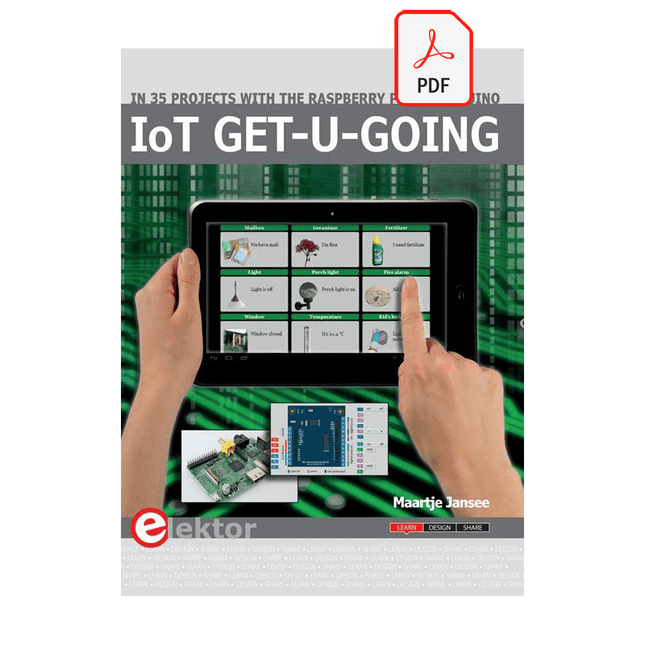
In 35 Projects with the Raspberry Pi and Arduino
The Internet of Things (IoT) is a trend with a strong technological impulse. At home, we want to do everything on our tablets, from browsing Facebook to watching TV, from operating lights to keeping an eye on the temperature.
In 35 fun projects, this book will show you how to build your own Internet of Things system. We'll cover the hardware (primarily the Raspberry Pi and Arduino) and the software that makes control via Internet possible. We employ Wi-Fi and radio links so no requirement any longer to install cabling crisscross through your home.
Assuming the projects in the book are finished, you have a complete Internet of Things system that allows you to control and view of everything in your home. For example, if there's something in the mail box or the car is securely in the garage. Also, you can switch on the lights and the alarm from your couch. The crisp explanations allow the projects to be customized with ease, for example, to turn on your coffee machine or TV remotely. The index gives easy access to creative projects that can serve as an example, enabling you to do all the connecting to the IoT independently. All project software can be downloaded free of charge from the Elektor website.
In this unique book, Raspberry Pi, Arduino and HTML webpages with stylesheets and JavaScript come together in clearly-described, easy-to-build projects. This special book is an essential part of your collection!
Le téléchargement intégral de ce numéro est disponible pour nos membres GOLD et GREEN sur le site Elektor Magazine !
Pas encore membre ? Cliquez ici.
carte émetteur-récepteur audio ESP32 (2)Transmission audio sans fil
émetteur AM par inductionUtiliser les PIO du Pico dans un croquis Arduino
les protocoles sans filUn guide technique
suivi de satellites avec LoRaTinyGS, le réseau open source qui capte les données spatiales
télécommande par sms compatible 4GContrôlez votre équipement à distance
sonde haute vitesseMesure à haute impédance jusqu’à 200 MHz
sur le vifKafka
KrakenSDR
tests de performance avec le RP2350Pico 2 : une vraie amélioration ?
mesures de champ électrique sans contact (2)Un vibromètre laser pour l’analyse des vibrations de la membrane
quartz et oscillateursAméliorer la précision des quartz grâce au choix des condensateurs
démarrer en électroniqueCI audio originaux
se lancer dans le codage d'un projet DIY
SPECTRAN® V6 MobileAnalyseur de spectre temps réel modulaire et configurable pour des mesures fiables sur l’ensemble des plages de fréquences
l’avenir de l’IA repose sur le siliciumEntretien avec Anastasiia Nosova
nœud de capteurs autonome v2.0 (architecture du système)Plateforme de mesure autonome alimentée par énergie solaire, avec GPS intégré, LoRaWAN et plus encore
positionnement précisTests du sondage de canal Bluetooth
développement logiciel piloté par les tests
voiture miniature contrôlée par SmartphoneWi-Fi + ESP32 + Smartphone = contrôle à distance
2025 : une odyssée de l’IAModèles de raisonnement en IA : la révolution de la chaîne de pensée
contrôleur de charge solaire avec MPPT (3)Logiciel et mise en service
caméra Web Raspberry Pi ZeroStreaming avec VPN ZeroTier
Le chargeur intégré est disponible pour nos clients OR et VERT sur le site d'Elektor Magazine !
Pas encore membre ? Cliquez ici .
Raspberry Pi Pico comme analyseur de spectre des FFT avec du matériel bon marché
régulateur de tension linéaire ±40 V une alimentation de qualité pour l'amplification du Fortissimo-100... et d'autres !
la communication sans fil des microcontrôleurs devient flexible l'EEPROM du point de vue de la mise en réseau pour les microcontrôleurs sans fil
5000 ? à gagner! participez au concours de conception d'innovation sans fil STM32
2023 : l'odyssée de l'IA en savoir plus sur le code ChatGPT
LoRa, un couteau suisse (1) le protocole LoRa et ses avantages
du courant réglable avec générateur de montre intégré testez vos alimentations, convertisseurs de tension et batteries
les nouvelles cartes Arduino UNO R4 Minima et WiFi
des potentiomètres logarithmiques qui sont exponentielles !
Carte d'interface pour pilote de moteur Un BoB pour un pilote continu de 5 A avec une taille de 3×3 mm
sur le vif danger de l'électronique
une architecture cellulaire de plus d'une consommation pour l'Internet des objets (IdO) ? Caractéristiques des technologies LTE-M et NB-IoT pour le développement de la basse consommation (LPWAN)
communication sans utilisation de systèmes et d'aides IoT dans les modules Arduino MKR normes de communication pour les modules Arduino pour l'IoT
pertes en courant alternatif dan les composants magnétiques évitez la surchauffe des inductances !
optimiser son déploiement cloud grâce aux équipements de mesure
mise en œuvre de Matter : à quoi sert le déploiement des équipements de Matter ?
le YARD Stick One en utilisant la méthode de test pour les fréquences de 1 GHz
relais à verrouillage drôle de composant, la série
PIC O?Horloge ? prendre le pouls du temps conception d'un récepteur de signaux horaires SDR
Directive sur le devoir de diligence Le statu quo ne suffira pas
démarrer en électronique ?amplificateur de tension
activateur d'infrasons avec l'Arduino Pro Mini un projet extrait du livre 'Arduino & Co.' d'Elektor
compteur d'énergie base sur le cloud avec un module ESP32 et un capteur tension/courant PZEM-004T
guide de programmation Bare-Metal (2) timer précis, UART et débogage
Hexadoku
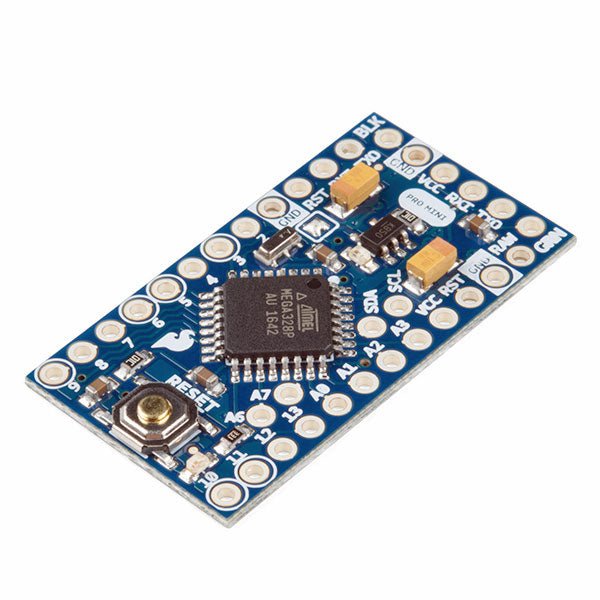
De Arduino Pro Mini is een microcontroller board gebaseerd op de ATmega328P.
Het heeft 14 digitale in-/uitgangspinnen (waarvan er 6 kunnen worden gebruikt als PWM-uitgangen), 6 analoge ingangen, een on-board resonator, een reset-knop, en gaten voor het monteren van pin headers. Een six-pin header kan worden aangesloten op een FTDI-kabel of Sparkfun breakout board om USB-voeding en communicatie te bieden aan de board.
De Arduino Pro Mini is bedoeld voor semi-permanente installatie in voorwerpen of tentoonstellingen. Het board komt zonder pre-gemonteerde headers, waardoor het gebruik van diverse types van schakelaars of het directe solderen van draden is toegestaan. De pin lay-out is compatibel met Arduino Mini.
Specificaties
Microcontroller
ATmega328P
Boord Stroomvoorziening
5-12 V
Circuit Werkspanning
5 V
Digitale I/O Pinnen
14
PWM Pennen
6
UART
1
SPI
1
I²C
1
Analoge ingangspinnen
6
Externe Onderbrekingen
2
DC stroom per I/O Pin
40 mA
Flash Geheugen
32 KB waarvan 2 KB gebruikt door bootloader
SRAM
2 KB
EEPROM
1 KB
Kloksnelheid
16 MHz
Afmetingen
18 x 33,3 mm
Downloads
Eagle files
Schematics
Mit dem Elektor Arduino Nano Trainingsboard (MCCAB) eigene Projekte realisieren
Der Mikrocontroller ist das wohl faszinierendste Teilgebiet der Elektronik, denn aufgrund der Vielzahl von Funktionen, die er auf seinem Chip vereinigt, ist er für den Entwickler ein universelles Multi-Tool zur Realisierung seiner Projekte. Praktisch jedes Gerät des täglichen Gebrauchs wird heute von einem Mikrocontroller gesteuert. Für einen elektronischen Laien blieb es aufgrund der Komplexität bisher allerdings ein Wunschtraum, eigene Ideen mit einem Mikrocontroller zu realisieren. Das Arduino-Konzept hat den Einsatz von Mikrocontrollern weitgehend vereinfacht, sodass jetzt auch Laien eigene Elektronik-Ideen mit einem Mikrocontroller verwirklichen können.
Buch & Hardware im Bundle: 'Learning by Doing'
Dieses im Bundle mitgelieferte Buch (im großen A4-Format) zeigt, wie man auch ohne große Erfahrung in Elektronik und Programmiersprachen eigene Projekte mit einem Mikrocontroller realisieren kann. Es ist ein Mikrocontroller-Praxiskurs für Einsteiger, denn nach einem Überblick über die Interna des Mikrocontrollers und einer Einführung in die Programmiersprache C liegt der Schwerpunkt des Kurses auf den praktischen Übungen. Der Leser eignet sich die erforderlichen Kenntnisse durch 'Learning by Doing' an: in dem umfangreichen Praxisteil mit 12 Projekten und 46 Übungen wird das im vorderen Teil des Buches Gelernte mit vielen Beispielen unterlegt. Die Übungen sind dabei so aufgebaut, dass der Bearbeiter eine Aufgabenstellung erhält, die er mit seinem im Theorieteil des Buches aufgebauten Wissen löst. Für jede Übung gibt es anschließend eine ausführlich erklärte und kommentierte Musterlösung, die dem Bearbeiter bei Problemen weiterhilft und die er mit seiner eigenen Lösung vergleichen kann.
Arduino IDE
In der Arduino IDE, einer Software-Entwicklungsumgebung, die kostenlos auf den eigenen PC heruntergeladen werden kann und die das gesamte Softwarepaket enthält, das für ein eigenes Mikrocontroller-Projekt benötigt wird, schreibt der Bearbeiter mit dem Editor der IDE seine Programme („Apps“) in der Programmiersprache C. Der in die Arduino IDE integrierte Compiler übersetzt sie in die Bits und Bytes, die der Mikrocontroller versteht und die dann über ein USB-Kabel in den Speicher des Mikrocontrollers auf dem Elektor Arduino Nano Trainingsboard (MCCAB) geladen werden.
Externe Sensoren, Motoren oder Baugruppen abfragen oder steuern
Das Elektor Arduino Nano Trainingsboard (MCCAB) enthält neben einem Mikrocontrollermodul Arduino Nano alle für die Übungen benötigten Bauteile wie Leuchtdioden, Schalter, Taster, akustische Signalgeber usw. Auch externe Sensoren, Motoren oder Baugruppen können mit diesem Mikrocontroller-Übungssystem abgefragt oder gesteuert werden.
Technische Daten (Arduino Nano Trainingsboard MCCAB)
Stromversorgung
Über die USB-Verbindung des zur Erstellung der Programme sowieso angeschlossenen PCs oder ein externes Netzteil (nicht im Lieferumfang enthalten)
Betriebsspannung
+5 Vcc
Eingangsspannung
Alle Eingänge
0 V bis +5 V
VX1 und VX2
+8 V bis +12 V (nur bei Verwendung eines externen Netzteils)
Mikrocontrollermodul
Arduino Nano
Hardwareperipherie
LCD
2x16 Zeichen
Potenziometer P1 & P2
JP3: Auswahl der Betriebsspannung von P1 & P2
Verteiler
SV4: Verteiler für die BetriebsspannungenSV5, SV6: Verteiler für die Ein-/Ausgänge des Mikrocontrollers
Schalter und Taster
RESET-Taster auf dem Arduino Nano-Modul6x Tastschalter K1 … K66x Schiebeschalter S1 … S6JP2: Verbindung der Schalter mit den Eingängen des Mikrocontrollers
Summer
Piezo-Summer Buzzer1 mit Steckbrücke auf JP6
Leuchtanzeigen
LED L auf dem Arduino Nano-Modul, verbunden mit GPIO D1311x LED: Zustandsanzeige für die Ein-/AusgängeJP6: Verbindung der LEDs LD10 … LD20 mit den GPIOs D2 … D12
Serielle SchnittstellenSPI & I²C
JP4: Auswahl des Signals an Pin X der SPI-Steckerleiste SV12SV9 bis SV12: SPI-Interface (3,3 V/5 V) bzw. I²C-Interface
Schaltausgang für externe Geräte
SV1, SV7: Schaltausgang (maximal +24 V/160 mA, extern zugeführt)SV2: 2x13 Pins zum Anschluss externer Module
3x3 LED-Matrix (9 rote LEDs)
SV3: Spalten der 3x3 LED-Matrix (Ausgänge D6 … D8)JP1: Verbindung der Reihen mit den GPIOs D3 … D5
Software
Library MCCABLib
Steuerung der Hardware-Komponenten (Schalter, Taster, Leuchtdioden, 3x3 LED-Matrix, Summer) auf dem MCCAB Trainingsboard
Betriebstemperatur
bis +40 °C
Abmessungen
100 x 100 x 20 mm
Technische Daten (Arduino Nano)
Mikrocontroller
ATmega328P
Architektur
AVR
Betriebsspannung
5 V
Flashspeicher
32 KB, davon 2 KB vom Bootloader belegt
SRAM
2 KB
Taktfrequenz
16 MHz
Analoge IN-Pins
8
EEPROM
1 KB
DC-Strom pro I/O-Pin
40 mA an einem I/O-Pin, insgesamt maximal 200 mA an allen Pins gemeinsam
Eingangsspannung
7-12 V
Digitale I/O-Pins
22 (6 davon sind PWM-fähig)
PWM-Ausgänge
6
Stromverbrauch
19 mA
Abmessungen
18 x 45 mm
Gewicht
7 g
Lieferumfang
Elektor Arduino Nano MCCAB Trainingsboard
Arduino Nano
Buch: Mikrocontroller-Praxiskurs für Arduino-Einsteiger