Hebt u altijd al uw elektronicaproject willen aansturen vanuiteen kleurrijke app op een Android smartphone of tablet? Dat is mogelijk met het in dit boek beschreven Android I/O-board. Met de bijbehorende software-library kunt u in Android Studio eenvoudig zelf een app programmeren die dit mogelijk maakt.Het Android I/O-board (los verkrijgbaar, wordt niet met boek meegeleverd!) bezit 22 pennen die u vanuit een app kunt aansturen als digitale I/O, ADC, PWM, touch-sensing en counter. Het Android I/O-board kan met de Android smartphone communiceren via Bluetooth, WiFi of USB. Het board is ook als datalogger te gebruiken. Kortom, dit is een veelzijdig board dat in ieder project past.Dit boek beschrijft stap voor stap hoe u uw project tot een succes kunt maken. Het boek behandelt gestructureerd de volgende onderwerpen:• Een snelle handleiding hoe u uw Android I/O-board up and running krijgt.• Een uitleg van alle mogelijkheden van het Android I/Oboard, met uitgebreide voorbeelden bij de verschillende opties.• Een stap-voor-stap handleiding hoe u een app kunt programmeren in Android Studio.• Een beschrijving van de firmware op het Android I/O-board en hoe u dit zelf met MPLAB-X kunt aanpassen.• Voorbeeld-projecten om inspiratie op te doen hoe u uw eigen project kunt aansturen met het Android I/O-board.Alle software in dit boek is als gratis download beschikbaar.
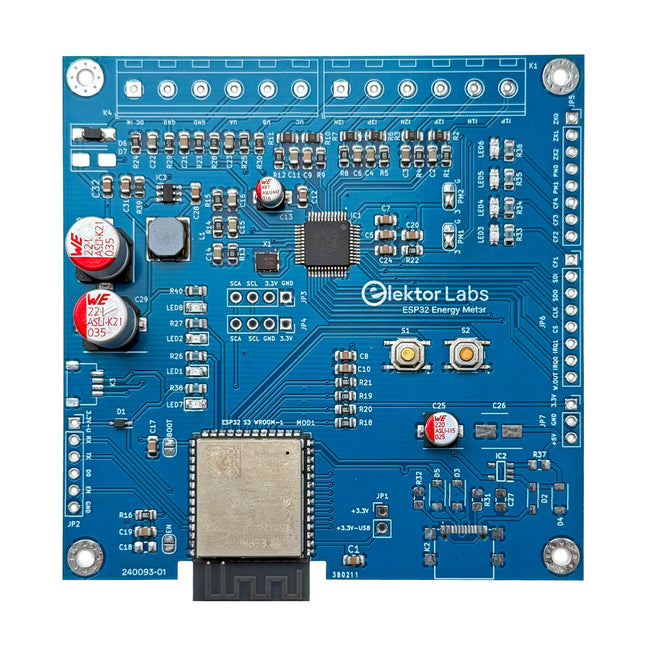
De Elektor ESP32 Energiemeter is een apparaat dat is ontworpen voor real-time energiemonitoring en smart home-integratie. Aangedreven door de ESP32-S3-microcontroller, biedt hij robuuste prestaties met modulaire en schaalbare functies.
Het apparaat maakt gebruik van een 110/230 VAC naar 12 VAC step-down transformator voor spanningsbemonstering, waardoor galvanische isolatie en veiligheid worden gegarandeerd. De compacte PCB-indeling omvat schroefklemmen voor veilige verbindingen, een Qwiic-connector voor extra sensoren en een programmeerheader voor directe ESP32-S3-configuratie. De energiemeter is compatibel met eenfasige en driefasige systemen, waardoor hij aanpasbaar is voor verschillende toepassingen.
De energiemeter is eenvoudig in te stellen en kan worden geïntegreerd met Home Assistant, waardoor realtime monitoring, historische analyses en automatiseringsmogelijkheden worden geboden. Het biedt nauwkeurige metingen van spanning, stroom en vermogen, waardoor het een waardevol hulpmiddel is voor het energiebeheer in huizen en bedrijven.
Kenmerken
Uitgebreide energiemonitoring: Krijg gedetailleerd inzicht in uw energieverbruik voor slimmer beheer.
Aanpasbare software: Pas de functionaliteit aan uw behoeften aan door aangepaste sensoren te programmeren en te integreren.
Klaar voor Smart Home: Compatibel met ESPHome, Home Assistant en MQTT voor volledige Smart Home-integratie.
Veilig & flexibel ontwerp: Werkt met een 110/230 VAC naar 12 VAC step-down transformator en beschikt over een voorgemonteerde SMD-kaart.
Snelle start: Inclusief één Current Transformer-sensor en toegang tot gratis installatiebronnen.
Specificaties
Microcontroller
ESP32-S3-WROOM-1-N8R2
IC voor energiemeting
ATM90E32AS
Statusindicatoren
4x LED's voor indicatie van energieverbruik2x Programmeerbare LED's voor aangepaste statusmeldingen
Gebruikersinvoer
2x drukknoppen voor gebruikersbediening
Uitvoer weergeven
I²C OLED-display voor realtime visualisatie van het energieverbruik
Ingangsspanning
12~16 VAC (via een step-down-transformator van 110/230 VAC naar 12 VAC)
Clampstroomsensor
YHDC SCT013-000 (100 A/50 mA) inbegrepen
Smart Home-integratie
ESPHome, Home Assistant en MQTTvoor naadloze connectiviteit
Connectiviteit
Header voor programmeren, Qwiic voor sensoruitbreiding
Toepassingen
Ondersteunt eenfasige en driefasige energiemonitoringsystemen
Afmetingen
79,5 x 79,5 mm
Inbegrepen
1x Gedeeltelijk gemonteerd bord (SMD-componenten zijn voorgemonteerd)
2x Schroefklemmenblokconnectoren (niet gemonteerd)
1x YHDC SCT013-000 stroomtransformator
Vereist
Voedingstransformator niet inbegrepen
Downloads
Datasheet (ESP32-S3-WROOM-1)
Datasheet (ATM90E32AS)
Datasheet (SCT013-000)
Frequently Asked Questions (FAQ)
Van prototype tot eindproduct
Wat begon als een innovatief project om een betrouwbare en gebruiksvriendelijke energiemeter te creëren met behulp van de ESP32-S3-microcontroller, is uitgegroeid tot een robuust product. Aanvankelijk ontwikkeld als een open-source-project, had de ESP32 Energiemeter tot doel nauwkeurige energiemonitoring, slimme huisintegratie en meer te bieden. Door nauwgezette hardware- en firmware-ontwikkeling is de energiemeter nu een compacte, veelzijdige oplossing voor energiebeheer.
Steeds vaker komen we op smartphones en tablet-computers het besturingssysteem Android tegen. Het aantal toepassingsprogramma's - de zogenaamde applicaties of kortweg apps - waarmee de apparaten individueel aan de voorkeuren en wensen van de gebruiker kunnen worden aangepast, neemt van dag tot dag toe. En de steeds betere technische uitvoering en uitrusting van de apparaten maken het nu mogelijk toepassingen te 'draaien' waarvoor een paar jaar geleden nog een desktop-PC of speciale hardware vereist was. Inmiddels kan elke smartphone de exacte (geografische) positie bepalen, video's opnemen - en nog veel meer. Maar bij het individualiseren van onze smartphone hoeven we ons niet te beperken tot kant-en-klare applicaties! Het is namelijk helemaal niet zo moeilijk om zelf Android-apparaten te programmeren en eigen apps te schrijven. Dit boek vormt een inleiding tot het programmeren van apps voor Android-apparaten. De werking van het Android-systeem wordt op begrijpelijke manier uitgelegd en we zien stap voor stap hoe applicaties kunnen worden geprogrammeerd. Aan de hand van een groot aantal voorbeelden worden allerlei toepassingsmogelijkheden getoond. Het scala loopt van eenvoudige rekenprogramma's via het uitlezen van sensoren en GPS-data tot het programmeren van applicaties voor internetcommunicatie. Naast het schrijven van applicaties in de programmeertaal Java wordt in dit boek ook besproken hoe apps met behulp van Javascript of PHP-scripts kunnen worden geprogrammeerd.
Build Smart Applications with Raspberry Pi, Arduino, and ESP32
Discover how easy and exciting mobile app development can be with MIT App Inventor. This hands-on guide takes you from basic concepts to building real-world mobile applications using a simple visual programming approach—no prior coding experience required. You will create IoT and AI-powered apps for Android devices and explore how App Inventor can also be used with iPhones and iPads.
Connect your applications to platforms such as Arduino UNO R4 WiFi, ESP32, Raspberry Pi Pico (2)W and Raspberry Pi 5, enabling you to build smart, connected systems.
Inside the book, you will learn how to:
Build interactive apps using buttons, images, sound, and multimedia
Create text-to-speech and speech-recognition applications
Develop camera-based and location-aware (GPS) apps
Design useful tools such as calculators and educational apps
Work with smartphone sensors like accelerometers and light sensors
Build AI-powered applications, including voice assistants and image-generation features
Send and receive messages, and create communication-based apps
Connect mobile apps to hardware using Wi-Fi and Bluetooth
Control real devices such as LEDs, motors, and sensors
Designed for beginners, students, and hobbyists, this book focuses on learning by doing. By the end, you will have the skills and confidence to create your own innovative applications that interact with both the digital and physical worlds.
Start building and turning your ideas into reality.
Build Smart Applications with Raspberry Pi, Arduino, and ESP32
Discover how easy and exciting mobile app development can be with MIT App Inventor. This hands-on guide takes you from basic concepts to building real-world mobile applications using a simple visual programming approach—no prior coding experience required. You will create IoT and AI-powered apps for Android devices and explore how App Inventor can also be used with iPhones and iPads.
Connect your applications to platforms such as Arduino UNO R4 WiFi, ESP32, Raspberry Pi Pico (2)W and Raspberry Pi 5, enabling you to build smart, connected systems.
Inside the book, you will learn how to:
Build interactive apps using buttons, images, sound, and multimedia
Create text-to-speech and speech-recognition applications
Develop camera-based and location-aware (GPS) apps
Design useful tools such as calculators and educational apps
Work with smartphone sensors like accelerometers and light sensors
Build AI-powered applications, including voice assistants and image-generation features
Send and receive messages, and create communication-based apps
Connect mobile apps to hardware using Wi-Fi and Bluetooth
Control real devices such as LEDs, motors, and sensors
Designed for beginners, students, and hobbyists, this book focuses on learning by doing. By the end, you will have the skills and confidence to create your own innovative applications that interact with both the digital and physical worlds.
Start building and turning your ideas into reality.
Elektor GREEN en GOLD leden kunnen deze uitgave hier downloaden.Nog geen lid? Klik hier om een lidmaatschap af te sluiten.
Super-servotestervoor vier servo’s – stand-alone of in-system
Analoge signalen en microcontrollersADC’s, DAC’s, stroommeting en meer
embedded world 2023
Sub-Nyquist-sampling in de praktijkhogere frequenties betrouwbaar bemonsteren met subsampling
Met Android-smartphone, spreek ik met ESP32?praktisch project met behulp van de Android WiFi-API
Actief 1kHz-filter voor vervormingsmetingmeet beter door het het meetsignaal te optimaliseren
Alle begin......multivibreert verder!
Project 2.0correcties, updates en brieven van lezers
Het nieuwe I3C-protocoleen waardig opvolger van I2C – of gebakken lucht?
BlueRC: IR-afstandsbediening met smartphone en ESP32universeel en aanpasbaar
Microcontroller-documentatie verklaarddeel 2: registers en blokschema’s
Automatisering van testen en metentestapparatuur programmeren om je te dienen
Elektor Infographicstesten en meten
Overspanningsbeveiliging voor veilige werkingtransiëntbescherming voor niet-geïsoleerde DC/DC-voedingsmodules
Meetapparatuur van het merk Wihatesters en meters voor installaties waar u op kunt bouwen
Automatisch testen en samenwerken aan testresultaten
Uit het leven gegrepenelektronica op hoog niveau
Energieloggermeet en registreert het stroomverbruik
Montage van de M.A.R.S. Rover Kit van 4tronix
Parkeerschijf met e-papier displayinnovatief digitaal alternatief
eCO2 Telegram-botmeet de luchtkwaliteit via Telegram
Achter de schermen van DHZ high-end audioTon Giesberts van Elektor over de fijne kneepjes van het analoog ontwerpen
Oost West Lab Bestwerk in uitvoering...
RFID-tag’s lezen, en een RFID-deurslotvoorbeeldprojecten uit de Elektor Arduino Experimenteerbundel
HF-stroomprobe voor oscilloscoopHF-stroommetingen gemakkelijk gemaakt
Niet voor watjes – Makerfabs Robot Arm Kitmet de Raspberry Pi Pico en MicroPython
Generatieve KIwie heeft dit eigenlijk gemaakt?
Hexadokupuzzelen voor elektronici
Kenmerken
4 1/2 bit resolutie (20000 counts)
Datalogger
Multimeter
Thermometer
True RMS test ondersteund
BLE 4.0 draadloze transmissie, stabieler, minder stroomverbruik
Ingebouwde offline opnamefunctie
Grafiek en Diagram modus helpen om de datatrend te analyseren
Met de zaklampfunctie om licht in de duisternis te brengen
Ondersteuning van NCV (non-contact voltage sense), een draadloze spanningszoeker
Brede ondersteuning op Android, iOS, Windowss
Inbegrepen
OWON OW18E Multimeter
Korte handleiding
Multimeter snoeren
K-type Thermokoppel
Schroefkop houder
App Downloaden
De Bluetooth functie van deze multimeter is compatibel met Android-app versie 1.5.8.0 of nieuwer.
Gebruik de QR code in de doos of ga naar http://files.owon.com.cn/bluetooth.
50+ Android Apps with Raspberry Pi, ESP32 and Arduino
This book is about developing apps for Android compatible mobile devices using the MIT App Inventor online development environment. MIT App Inventor projects can be in either standalone mode or use an external processor. In standalone mode, the developed application runs only on the mobile device (e.g. Android). In external processor-based applications, the mobile device communicates with an external microcontroller-based processor, such as Raspberry Pi, Arduino, ESP8266, ESP32, etc.
In this book, many tested and fully working projects are given both in standalone mode and using an external processor. Full design steps, block programs, circuit diagrams, QR codes and full program listings are given for all projects.
The projects developed in this book include:
Using the text-to-speech component
Intonating a received SMS message
Sending SMS messages
Making telephone calls using a contacts list
Using the GPS and Pin-pointing our location on a map
Speech recognition and speech translation to another language
Controlling multiple relays by speech commands
Projects for the Raspberry Pi, ESP32 and Arduino using Bluetooth and Wi-Fi
MIT APP Inventor and Node-RED projects for the Raspberry Pi
The book is unique in that it is currently the only book that teaches how to develop projects using Wi-Fi and Node-RED with MIT App Inventor. The book is aimed at students, hobbyists, and anyone interested in developing apps for mobile devices.
All projects presented in this book have been developed using the MIT App Inventor visual programming language. There is no need to write any text-based programs. All projects are compatible with Android-based mobile devices. Full program listings for all projects as well as detailed program descriptions are given in the book. Users should be able to use the projects as they are presented, modifying them to suit their own needs.
Ready-to-use devices and self-built Arduino nodes in the 'The Things Network'
LoRaWAN has developed excellently as a communication solution in the IoT. The Things Network (TTN) has contributed to this. The Things Network was upgraded to The Things Stack Community Edition (TTS (CE)). The TTN V2 clusters were closed towards the end of 2021.
This book shows you the necessary steps to operate LoRaWAN nodes using TTS (CE) and maybe extend the network of gateways with an own gateway. Meanwhile, there are even LoRaWAN gateways suitable for mobile use with which you can connect to the TTN server via your cell phone.
The author presents several commercial LoRaWAN nodes and new, low-cost and battery-powered hardware for building autonomous LoRaWAN nodes. Registering LoRaWAN nodes and gateways in the TTS (CE), providing the collected data via MQTT and visualization via Node-RED, Cayenne, Thingspeak, and Datacake enable complex IoT projects and completely new applications at very low cost.
This book will enable you to provide and visualize data collected with battery-powered sensors (LoRaWAN nodes) wirelessly on the Internet. You will learn the basics for smart city and IoT applications that enable, for example, the measurement of air quality, water levels, snow depths, the determination of free parking spaces (smart parking), and the intelligent control of street lighting (smart lighting), among others.
De MDP-M01 is een display control module uitgerust met een 2,8-inch TFT-scherm. Het scherm kan 90 graden worden gedraaid, wat voor gebruikers handig is om gegevens en golfvormen goed te kunnen bekijken. De MDP-M01 is geschikt voor het online monitoren en beheren van MDP-P906 mini digitale voedingsmodules en andere modules van het MDP-systeem via 2,4 GHz draadloze communicatie, en kan tot 6 submodules tegelijkertijd beheren.
Specificaties
Schermgrootte
2,8' TFT
Schermresolutie
240 x 320 cm
Voeding
Micro USB voedingsingang, of voeding uit een submodule via speciale voedingskabel
Voedingsspanning
DC 5 V / 0,3 A
Andere functies
Kan tot 6 submodules beherenUpgrade firmware via Micro USB
Afmetingen
107 x 66 x 13,6 mm
Gewicht
133 g
Inbegrepen
1x MDP-M01 Smart Digital Monitor
1x kabeltje (2.5 mm jack naar Micro USB)
Downloads
User Manual v3.4
Firmware v1.32
,
van David Ashton
Review: De zingende en dansende multitester DSO-TC3
De DSO-TC3 is een van die verbazingwekkende alles-in-één meetapparaten die tegenwoordig steeds vaker lijken voor te komen. Het biedt een breed scala aan functies voor...